
ChatGPT
How to use ChatGPT for study (2026): Prompt design and Study mode. Complete guide with practical tips, tutorials, and real-world examples to boost efficiency
Usage Tips
How to Design Precise Prompts for Education
Provide context, clear objectives, and specify format. Example: Instead of 'help me write a paper', say 'I need a 3000-word paper on AI in education with 4 sections: background, cases, pros/cons, future outlook. Please provide an outline first.' Use specific questions like 'Explain this concept in simple terms with examples' or 'Compare views A and B' for better results.
How to Use Iterative Step-by-Step Approach
Don't request complete content at once. Process: 1) Get outline and framework, 2) Develop each section gradually, 3) Optimize language and logic, 4) Review and modify. This ensures better quality and deeper learning. For complex topics, break them down into smaller parts and refine each part separately.
How to Customize Prompts for Different Subjects
For humanities: emphasize viewpoint analysis, literature citations, and argumentation logic. For sciences: emphasize formula derivations, experimental procedures, and data interpretation. For programming: emphasize code comments, algorithm explanations, and debugging methods. Tailor your prompts to match the subject's requirements.
How to Use Study Mode for Exam Preparation
Enable Study Mode (select 'Study and learn' from tools) when preparing for exams. Start with 'I need to prepare for my exam on [topic]. Can you help me learn it step by step?' Engage with the interactive prompts, work through scaffolded explanations, use knowledge checks to test understanding, and review personalized feedback to identify areas needing more study.
How to Use Quizzes Mode for Self-Assessment
Quizzes Mode is a 'test yourself' learning feature that generates question cards based on your input. Select 'Quizzes' from tools, then provide a prompt like 'Create a 10-question math quiz for grade 8 students' or 'Generate a quiz on photosynthesis for biology review.' ChatGPT will automatically generate questions, judge answers, and provide feedback. Perfect for self-testing, practice, and reinforcing knowledge points.
How to Use Custom Learning GPTs
Custom Learning GPTs are 'specialized tutors' built on Study Mode with different roles and prompts. Access them via 'Explore GPTs' in ChatGPT. Examples include practice coach GPTs for problem-solving, flashcard assistant GPTs for language learning, essay tutor GPTs for academic writing, math tutor GPTs, and programming mentor GPTs. Each GPT is optimized for specific learning scenarios, providing more focused and professional guidance than the general Study Mode.
How to Use ChatGPT for Academic Writing
Create a research topic, provide context and requirements, get an outline first, then develop each section step by step. Use specific prompts like 'Help me improve the academic writing style of this section' or 'Check the citation format.' Always review and edit the content yourself, ensuring you understand everything before submission.
How to Use ChatGPT for Course Learning
Upload course materials or input key points, request explanations in simple language with examples, ask for study notes and mind maps, then use Study Mode for deeper understanding. Generate review questions and practice self-assessment. Create separate conversations for different courses to maintain organization.
How to Verify and Think Critically
ChatGPT can make errors. Always: 1) Cross-verify key information with multiple sources, 2) Consult authoritative sources and textbooks, 3) Ask teachers or peers for confirmation, 4) Check logical consistency. For critical information like dates, names, and data, always double-check.
How to Maximize Free Tier Usage
Free tier has limited access. Plan usage wisely: use for quick questions and brainstorming, save Study Mode for important learning sessions. Group related questions in one conversation. Consider upgrading to ChatGPT Go (about $8/month, region-dependent) for higher limits and stronger daily capabilities if you use it frequently.
ChatGPT is an AI language model developed by OpenAI that can assist students in enhancing learning efficiency, understanding complex concepts, and completing academic tasks within the educational field. You can use ChatGPT for academic writing, course learning, homework assistance, exam preparation, and more. The free tier is available right away, and this complete guide includes practical tips, step-by-step tutorials, and real-world examples to help you master ChatGPT usage and boost learning efficiency!
Quick Start: Choose the Right Learning Mode
ChatGPT offers multiple learning modes. Choose based on your needs:
- Regular Chat Mode: Suitable for quick information lookup, simple Q&A, and brainstorming
- Study Mode (Study and learn): Suitable for deep concept understanding, homework help, and exam preparation
- Quizzes Mode: Suitable for self-testing, practice questions, and reinforcing knowledge points (available for Plus users)
When to Use Which Mode?
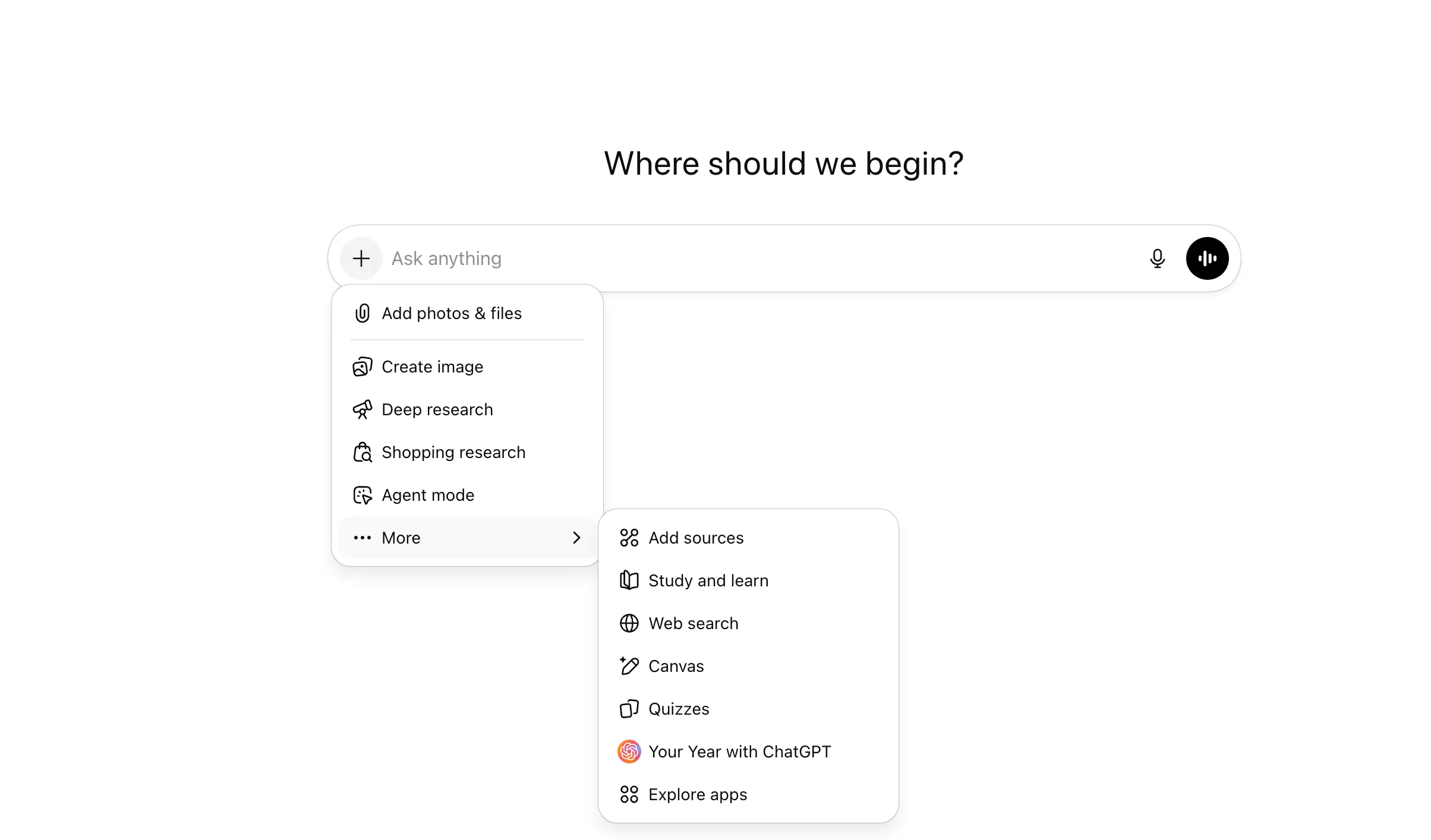 (Plus subscription mode selection interface)
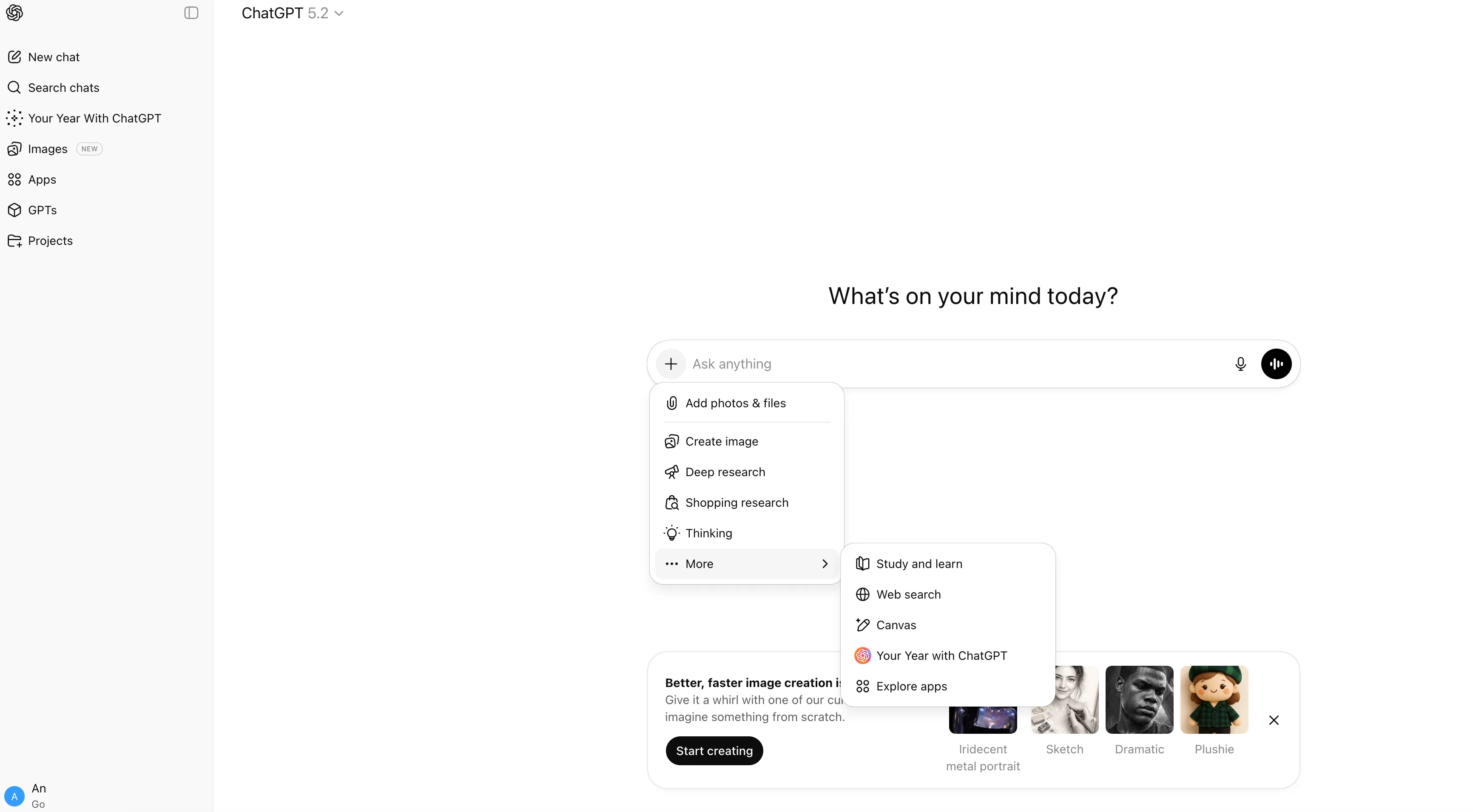 (Go subscription mode selection interface)
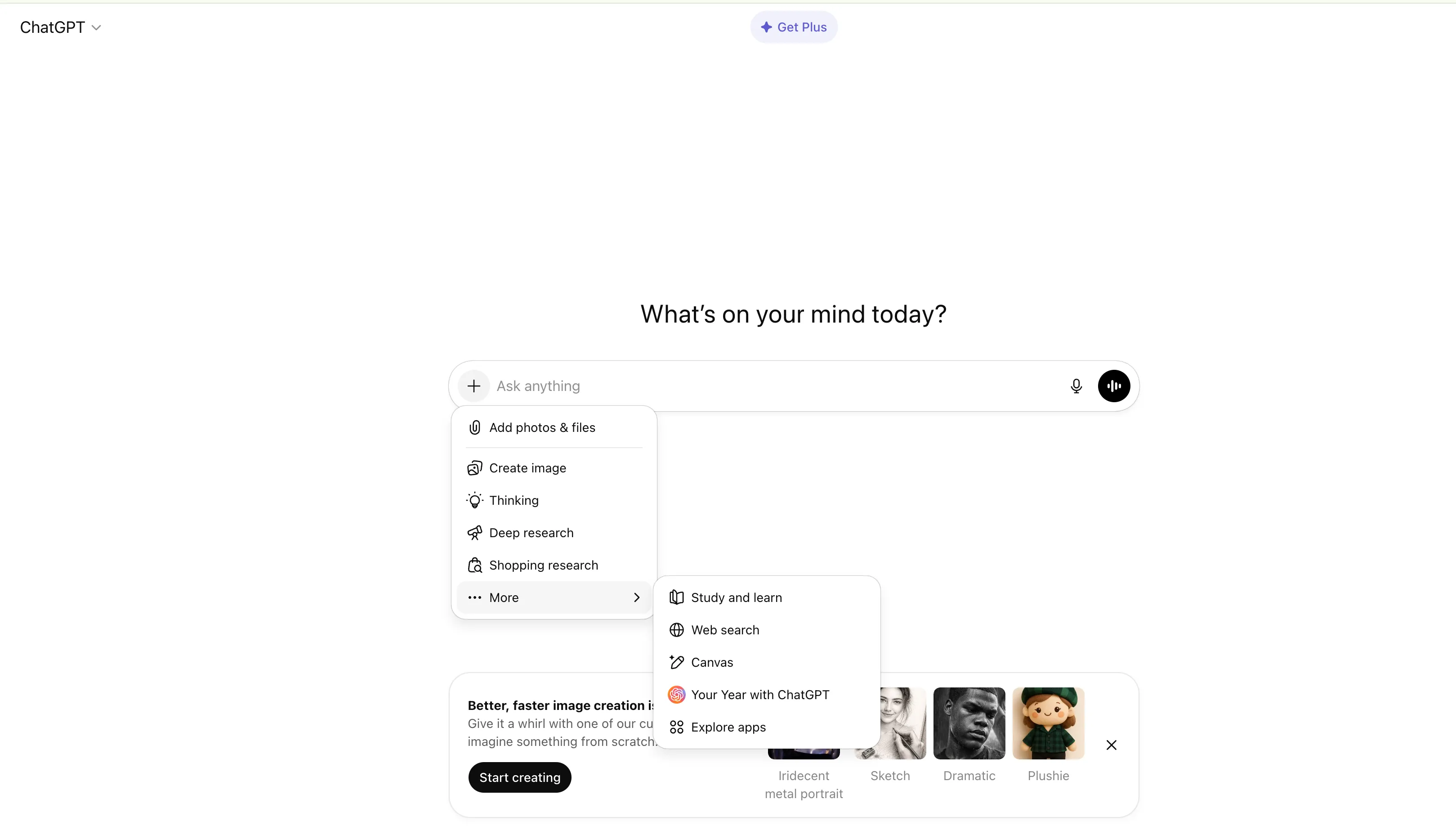 (Free tier mode selection interface)
- Need quick answers → Regular mode
- Need to understand concepts → Study mode
- Need to test knowledge → Quizzes mode
- Need comprehensive learning → Use study mode first, then quizzes mode
ChatGPT Core Features: Usage Guide
How to Use Study Mode
Study Mode helps you work through problems step by step instead of just getting answers. It’s especially useful for homework help, test prep, and learning new topics.
How to Enable: Select “Study and learn” from tools in ChatGPT and ask your question.
Key Features:
- Interactive Prompts: Uses Socratic questioning to guide understanding and promote active learning
- Scaffolded Responses: Information is organized into easy-to-follow sections that highlight key connections
- Personalized Support: Lessons are tailored to your skill level
- Knowledge Checks: Includes quizzes and open-ended questions with personalized feedback
Usage Tips:
- Be specific about your learning goals or the problem you’re working on
- Engage with the questions and prompts—don’t just read the answers
- Use knowledge checks to identify weak areas
- Toggle study mode on for deep learning, off when you need quick answers
How to Use Quizzes Mode
Quizzes Mode generates question cards based on your input. It’s perfect for self-assessment, practice, and reinforcing knowledge points.
How to Enable: Select “Quizzes” from tools in ChatGPT, then provide a prompt describing what you want to quiz yourself on.
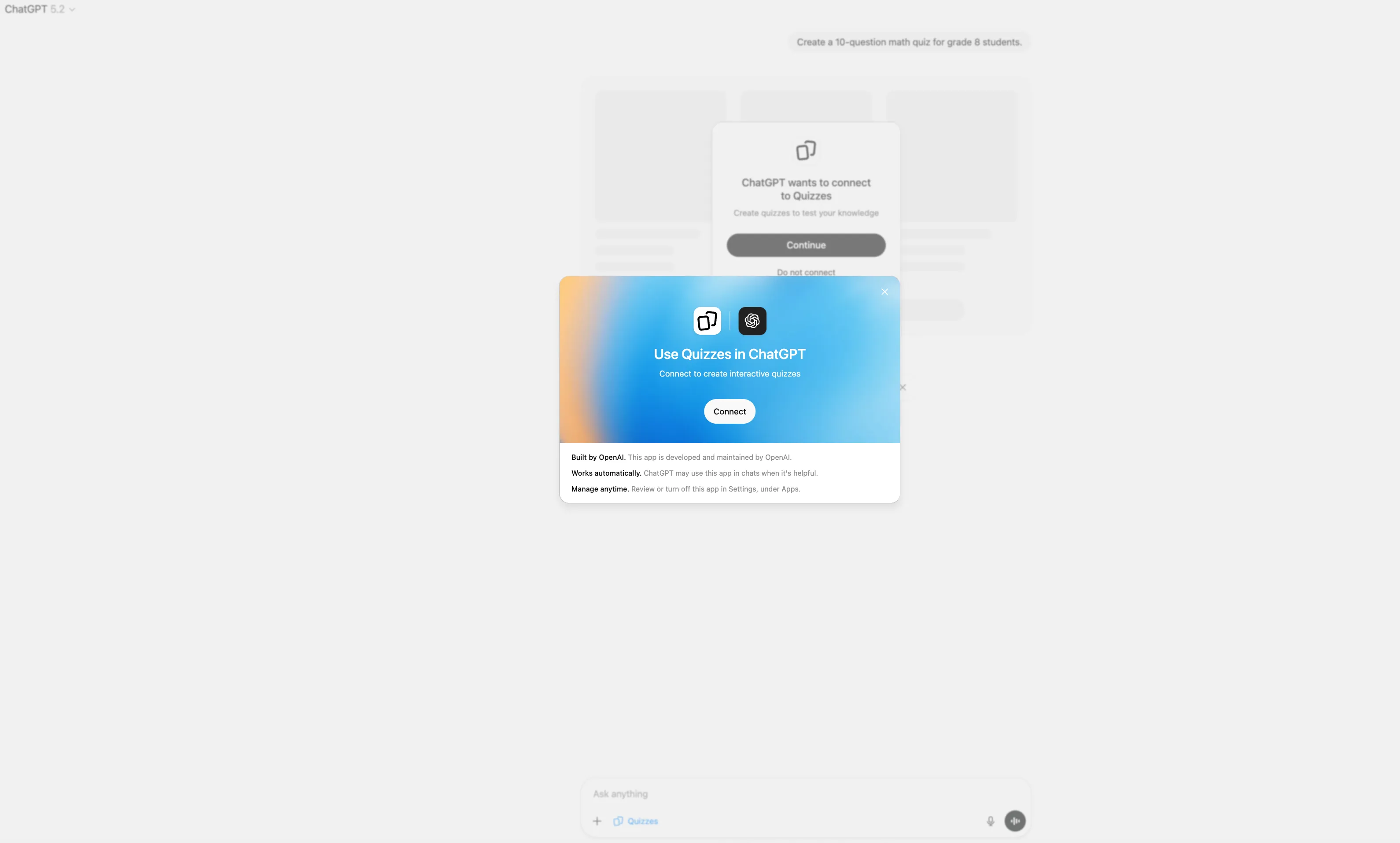
Example Prompts:
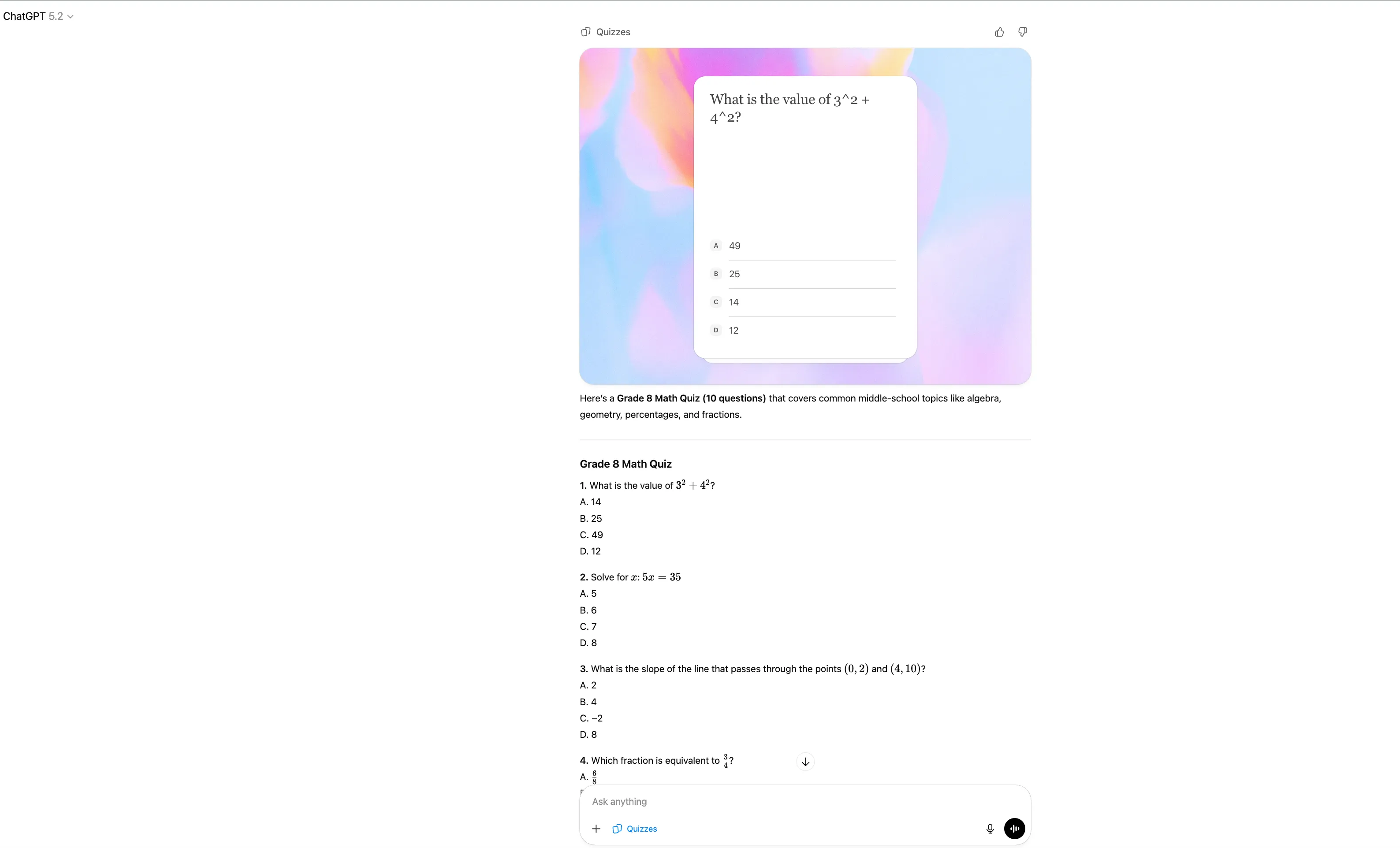
- “Create a 10-question math quiz for grade 8 students”
- “Generate a quiz on photosynthesis for biology review”
- “Make a 15-question history quiz about World War II”
- “Create a chemistry quiz on the periodic table”
Key Features:
- Automatic Question Generation: Creates questions based on topic and difficulty level
- Answer Judging: Automatically evaluates answers and provides immediate feedback
- Personalized Feedback: Provides explanations for correct and incorrect answers
- Flexible Format: Supports multiple choice, short answer, and other formats
Usage Tips:
- Be specific about the topic, difficulty level, and number of questions
- Use Quizzes Mode regularly after studying a topic
- Review feedback carefully to understand why answers are correct or incorrect
- Combine with Study Mode: learn first, then test
- Create quizzes for different subjects to maintain comprehensive review
Best Use Cases:
- Exam Preparation: Generate practice quizzes on test topics
- Regular Review: Test yourself on learned material to reinforce knowledge
- Identify Weak Areas: Use quiz results to identify topics needing more study
- Self-Assessment: Check understanding before moving to new material
How to Use Custom Learning GPTs
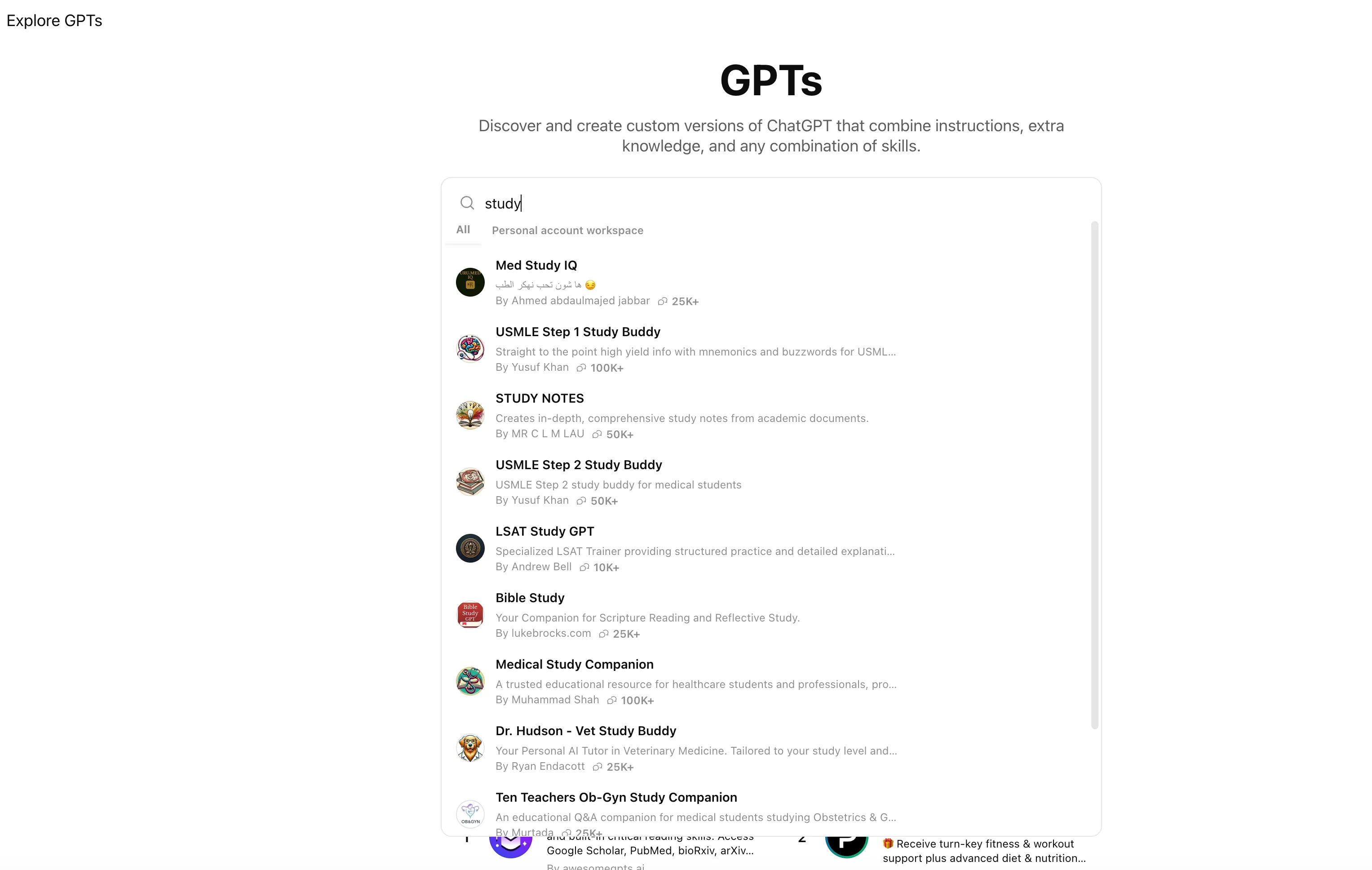
Custom learning modes in GPTs are “specialized tutors” built on top of the general Study Mode, using different roles and prompts. They provide more professional and focused learning experiences for specific scenarios.
Common Custom Learning Modes:
- Practice Coach GPT: Problem practice, problem-solving techniques, weak area training
- Flashcard Assistant GPT: Language learning, flashcards, memory techniques, spaced repetition
- Essay Tutor GPT: Academic writing, paper structure, literature review, citation formats
- Math Tutor GPT: Math tutoring, step-by-step problem solving, concept explanations, formula derivations
- Programming Mentor GPT: Programming education, code review, debugging, algorithm explanations, best practices
How to Use:
- Click “Explore GPTs” in ChatGPT
- Search for keywords like “learning,” “education,” “practice,” etc.
- Select the appropriate GPT based on your learning needs
- Chat with the custom GPT to receive professional guidance
Usage Tips:
- Clarify your learning goals and current level
- Ask targeted questions to leverage role characteristics
- Use general Study Mode first for basics, then custom GPTs for deeper specialization
- Try multiple GPTs to find the teaching style that suits you best
How to Design Effective Prompts
Principles: Provide context, clarify objectives, specify formats
Examples:
- ❌ Bad: “Help me write my paper”
- ✅ Good: “I need to write a 3000-word paper on AI applications in education, including: 1) Background 2) Case studies 3) Pros/cons analysis 4) Future outlook. Please first provide an outline structure.”
Usage Tips:
- The more specific your prompt, the better the response
- Include context about your learning level and goals
- Specify the format and structure you need
- Ask for examples and analogies when learning complex concepts
💡 More Prompt Templates: Visit the AI Study Prompts Library for ready-to-use prompts covering exam preparation, essay writing, note-taking, concept learning, and more. All prompts are compatible with ChatGPT Study Mode and can be copied directly.
Core Learning Scenarios and Practical Cases
Scenario 1: Academic Writing
Practical Process:
- Use prompts to generate an outline: “I need to write a paper on [topic]. Please help me create a detailed outline”
- Get key points and arguments for each section
- Expand content step by step, requesting specific examples
- Optimize and edit to ensure academic standards compliance
Related Prompts: “Create paper outline and structure” (available in the prompt library)
Scenario 2: Course Learning and Review
Related Prompts: “Explain concepts using Feynman technique,” “Build knowledge graph,” “Create flashcards” (available in the prompt library)
Using Study Mode:
After enabling Study Mode: “I need to understand [complex concept]. Can you help me learn it step by step?”
AI will:
- Ask about your existing knowledge
- Provide scaffolded explanations
- Check understanding through questions
- Build connections between concepts
Scenario 3: Homework and Programming
Programming Debugging Process:
- Paste code and error messages
- Request debugging: “Please identify the error and explain, provide a fix with comments”
- After understanding the error, request optimization suggestions
- Expand learning: ask about related concepts and best practices
Related Prompts: “Learn programming concepts” (available in the prompt library)
Scenario 4: Exam Preparation
Complete Process:
- Organize materials: Input course content
- Enable Study Mode: “I need to prepare for an exam on [topic]. Can you help me learn it step by step?”
- Follow guidance: Answer AI’s assessment questions
- Learn step by step: Follow explanations to understand gradually
- Use Quizzes Mode: “Create 15 quiz questions on [topic]”
- Identify weak areas: Focus on reviewing based on quiz results
Related Prompts: “Create exam study guide,” “Optimize study plan for multiple exams,” “Analyze past exam patterns,” “Generate exam-style questions” (available in the prompt library)
Important Notes
⚠️ Academic Integrity
- Do not submit AI-generated content directly: Always incorporate your own understanding and modifications
- Comply with institutional policies: Understand your school’s guidelines for AI tool usage
- Disclose AI assistance: If required, clearly indicate the use of AI tools
⚠️ Information Accuracy
- Verify critical details: Especially data, dates, names, etc.
- Cross-verify: Compare multiple sources to confirm information
- Consult authorities: Seek guidance from instructors or experts on critical questions
- Internet Search Feature: ChatGPT’s internet search can increase information credibility, but you need to verify the authenticity of information sources. Prioritize authoritative institutions, academic journals, and official releases. Be cautious about information from unknown sources
⚠️ Responsible Use
- Use as a learning tool: Employ for understanding, inspiration, and support—not as a substitute for critical thinking
- Maintain critical thinking: Question and validate AI responses
- Enhance personal skills: The ultimate goal is to improve your own learning capabilities
Subscription Plan Selection Guide
On January 16, 2026, OpenAI officially announced that ChatGPT Go is globally available in all ChatGPT-supported countries and regions.
Current rollout covers about 170+ countries and regions (the exact count may shift slightly as OpenAI updates the support list), including the U.S., most of Europe, most of Asia, and major South American markets.
Starting April 16, 2026, OpenAI introduced ads for Free and Go users in Australia, New Zealand, and Canada. Plus, Pro, Business, Enterprise, and Education plans are not affected.
Detailed Comparison (Free vs Go vs Plus)
| Item | Free | Go ($8/month) | Plus ($20/month) |
|---|---|---|---|
| Primary Models | GPT-5.3 (limited), may fall back to smaller models | GPT-5.3 Instant (broader day-to-day access than Free) | GPT-5.3 + GPT-5.4 Thinking (advanced reasoning, selectable modes) |
| Usage Limits | Strict limits (can be restrictive for frequent use) | Generally higher than Free (actual limits vary by account and region) | Higher limits (with priority handling in many scenarios) |
| Ads | Yes (bottom placement, adult users) | Yes (same policy as Free) | No ads (cleaner experience) |
| Image Generation | Limited and slower | More image generation capacity | Faster + higher quota |
| File Upload / Analysis | Limited | Higher upload limits | Further increased limits |
| Memory & Context | Shorter context | Longer memory and context than Free | Same or higher |
| Advanced Thinking | None or very limited | Light version (availability and limits may vary) | Full GPT-5.4 Thinking (deeper multi-step reasoning) |
| Deep Research / Agent Mode | Limited or unavailable | Unavailable | Available (quota-based) |
| Codex (Coding Agent) | Very limited or unavailable | Unavailable | Available (advanced coding workflow) |
| Custom GPTs | Cannot create | Can create and use | Can create and use |
| Other Advanced Features | Basic | Basic + Projects | Deep Research, Sora video (limited), priority new features |
| Best For | Occasional usage, simple Q&A | High-frequency daily users (writing, studying, chatting without heavy reasoning needs) | Professional/power users needing advanced reasoning, research, and coding |
Source: OpenAI pricing pages and 2026 user/media observations. Actual limits can change over time.
Core Advantages of Go (vs Free)
- Fewer practical interruptions: Free can throttle quickly under heavier use, while Go is generally more stable for daily usage.
- More practical for study workflows: More image generations, higher file limits, and longer memory make ongoing sessions easier.
- Good value for frequent users: If you rely on ChatGPT daily for writing, study support, and routine tasks, Go is often a cost-effective upgrade.
- Useful extra: You can create and use Custom GPTs, which is typically unavailable on Free.
Main Trade-offs of Go (vs Plus)
- Still includes ads: Sponsored content can appear near the bottom of chats in supported regions.
- No full premium reasoning tier: Go may not include the same high-end reasoning depth as Plus for complex tasks.
- Missing pro-level tools: No full Deep Research, Codex, or Agent Mode workflows.
- Thinking is lighter: Go may include a lighter GPT-5.4 mini thinking path, but with stricter limits and lower depth.
Selection Recommendations:
- Free Tier: Suitable for first-time users to experience basic features
- ChatGPT Go: Suitable for students who need higher daily limits and better continuity, strong value (~$8/month, region-dependent)
- ChatGPT Plus: Suitable for students who need advanced reasoning, deeper research workflows, and premium feature access ($20/month)
Summary
ChatGPT is a practical learning assistance tool. Key points:
✅ Choose the right mode: Use regular mode for quick answers, Study Mode for deep learning, Quizzes Mode for self-testing
✅ Design precise prompts: Provide context, clarify objectives, specify formats—the more specific, the better
✅ Iterate step by step: Don’t request complete content at once, get an outline first then refine gradually
✅ Verify information accuracy: Especially data, dates, names—cross-verify multiple sources
✅ Maintain academic integrity: Always incorporate your own understanding and modifications, comply with school policies
💡 Key Advice: Use ChatGPT as a learning partner, not an answer machine. Think first, then ask; understand principles, don’t copy directly. Combine Study Mode, precise prompts, and step-by-step iteration to comprehensively improve learning efficiency.
Use Cases
- Academic writing and essay assistance
- Course content explanation and summarization
- Homework and project guidance
- Study notes and review materials
- Programming assignment debugging
- Exam preparation and practice
Key Features
- Natural language conversation
- Study Mode for step-by-step learning
- Quizzes Mode for self-assessment and practice
- Custom Learning GPTs (specialized tutors built on Study Mode)
- Code generation and debugging
- Essay and paper writing assistance
- Research and information gathering
- Interactive prompts and knowledge checks
- Language translation
- Creative writing support
Pros
- Free tier available
- Very user-friendly interface
- Excellent for brainstorming
- Supports multiple languages
- Can handle various tasks
Cons
- Free tier has limitations
- May generate inaccurate information
- Requires fact-checking
- Not suitable for real-time information
Frequently Asked Questions
Is ChatGPT free to use?
Yes, ChatGPT offers a free tier with limited access. There are also paid subscriptions: ChatGPT Go (about $8/month, region-dependent) provides higher limits and stronger day-to-day capabilities, while ChatGPT Plus ($20/month) offers a broader advanced feature set including deeper research and higher priority access.
What's the difference between ChatGPT Go and Plus?
ChatGPT Go (about $8/month, region-dependent) provides around 10x free-tier usage, stronger daily model access, and practical features for frequent study workflows. ChatGPT Plus ($20/month) offers higher limits, more advanced reasoning and tooling (such as Deep Research/Agent-related workflows where available), and a cleaner premium experience. Go fits budget-focused high-frequency users, while Plus fits professional and heavy-power users.
Can I use ChatGPT for academic writing?
Yes, but use it responsibly. ChatGPT can help with drafting and brainstorming, but you should always review and edit the content yourself. Check your institution's policies on AI tool usage.
How accurate is ChatGPT?
ChatGPT is generally accurate but can make mistakes, especially with recent events or specialized knowledge. Always fact-check important information.
What is Study Mode and how do I use it?
Study Mode is a learning-focused feature that helps you work through problems step by step instead of just getting answers. To use it, select 'Study and learn' from tools in ChatGPT and ask your question. It provides interactive prompts, scaffolded explanations, personalized support, and knowledge checks—perfect for homework help, test prep, and mastering new concepts.
What is Quizzes Mode and how do I use it?
Quizzes Mode is a 'test yourself' learning feature that generates question cards based on your input. Select 'Quizzes' from tools in ChatGPT, then provide a prompt like 'Create a 10-question math quiz for grade 8 students' or 'Generate a quiz on photosynthesis for biology review.' ChatGPT will automatically generate questions, judge your answers, and provide feedback. It's perfect for self-assessment, practice, and reinforcing knowledge points—essentially a knowledge check feature within the learning tools.
How do I use ChatGPT effectively for education?
Start with specific, well-structured prompts that provide context and clear objectives. Use Study Mode for deeper learning—select 'Study and learn' from tools for homework help, test prep, and learning new topics. Break complex tasks into steps: get an outline first, then develop each section gradually. Customize prompts for different subjects: emphasize analysis for humanities, formulas for sciences, code comments for programming. Always verify information and think critically.
Why are ChatGPT's answers inaccurate?
ChatGPT's answers can be inaccurate due to several reasons: training data may be outdated, the model may produce hallucinations (fabricated information), and it has limited understanding of specialized fields. Solutions: enable internet search to get the latest information, cross-verify critical information (data, dates, names), prioritize authoritative sources, and maintain skepticism about uncertain information.
Study Mode is too slow, how to get quick answers?
If you need quick facts, turn off Study Mode and use regular mode. If you need deep understanding, enable Study Mode. You can flexibly switch between modes anytime during a conversation—enable or disable Study Mode as needed based on whether you want quick answers or step-by-step learning.
How to avoid over-reliance on ChatGPT?
Think first, then ask ChatGPT. Understand principles, don't copy answers directly. Use ChatGPT as a 'learning partner' not an 'answer machine.' Regular self-testing helps ensure true mastery of knowledge. Remember that ChatGPT is a tool to assist learning, not replace your own thinking and understanding.
Is the free tier enough?
The free tier is suitable for: basic Q&A, simple learning tasks, and initial trial use. Consider upgrading to ChatGPT Go (about $8/month, region-dependent) if you need much higher daily limits and better continuity for frequent usage. Consider upgrading to ChatGPT Plus ($20/month) if you need higher-end reasoning, deeper research workflows, and more advanced productivity capabilities.