
Free AI Flashcard Maker – Turn Notes into Flashcards

Use AI to instantly generate flashcards from class notes, textbooks, and PDFs. Simply upload or paste text to create flashcards without complicated steps. Supports exporting to TXT, Markdown, Word, PDF, Anki, or Quizlet, for easy management and review. Free for students to improve learning efficiency.

Maximum 2,500 characters. The AI will analyze your text and generate flashcards automatically.

Anki & Quizlet import templates

Use these copy-ready templates with the ' Learning Center ' export options to move cards into Anki or Quizlet fast.

Anki import template (txt/csv)

  1. Prepare 3 columns: Front, Back, Tags (optional).
  2. Save as UTF-8 txt/csv with Tab or comma separators.
  3. In Anki import: Field 1 = Front, Field 2 = Back, Field 3 = Tags.
apple	Apple	Vocabulary
banana	Banana	Vocabulary
apple,Apple,Vocabulary
banana,Banana,Vocabulary
Quizlet import template

  1. One line = one card, Term on the left and Definition on the right.
  2. Use Tab as the separator and line break for new cards.
  3. Paste into Quizlet import and create.
apple	Apple
banana	Banana
I'm from China.	I'm from China.

Input & output example

Input example (50-100 chars)

Photosynthesis uses sunlight, water, and carbon dioxide to produce glucose and oxygen in chloroplasts.
Output example (5 Q/A flashcards)
  1. Q: What 3 inputs are required for photosynthesis? A: Sunlight, water, and carbon dioxide.
  2. Q: What are the two main outputs of photosynthesis? A: Glucose and oxygen.
  3. Q: In which organelle does photosynthesis happen? A: Chloroplasts.
  4. Q: Why is photosynthesis important to plants? A: It produces glucose for energy and growth.
  5. Q: How does this process help other organisms? A: It releases oxygen and supports food chains.

How to Use AI Flashcard Maker

Get started in four steps

1

Upload or Paste Content

Upload a PDF, Word document, text file, or Markdown file to the AI flashcard maker. You can also paste text directly.

2

Click Generate

Click 'Generate Flashcards' and the AI flashcard maker will create your cards.

3

Review Your Flashcards

Check your flashcards and make sure they look good. You can edit them if needed.

4

Save or Export

View your flashcards in the Learning Center, or export them as TXT, Markdown, Word, or PDF files, or export as Anki or Quizlet format.

What Are Flashcards?

Flashcards are study cards with a question on one side and the answer on the other. They help you memorize information through active recall—trying to remember the answer before flipping the card.

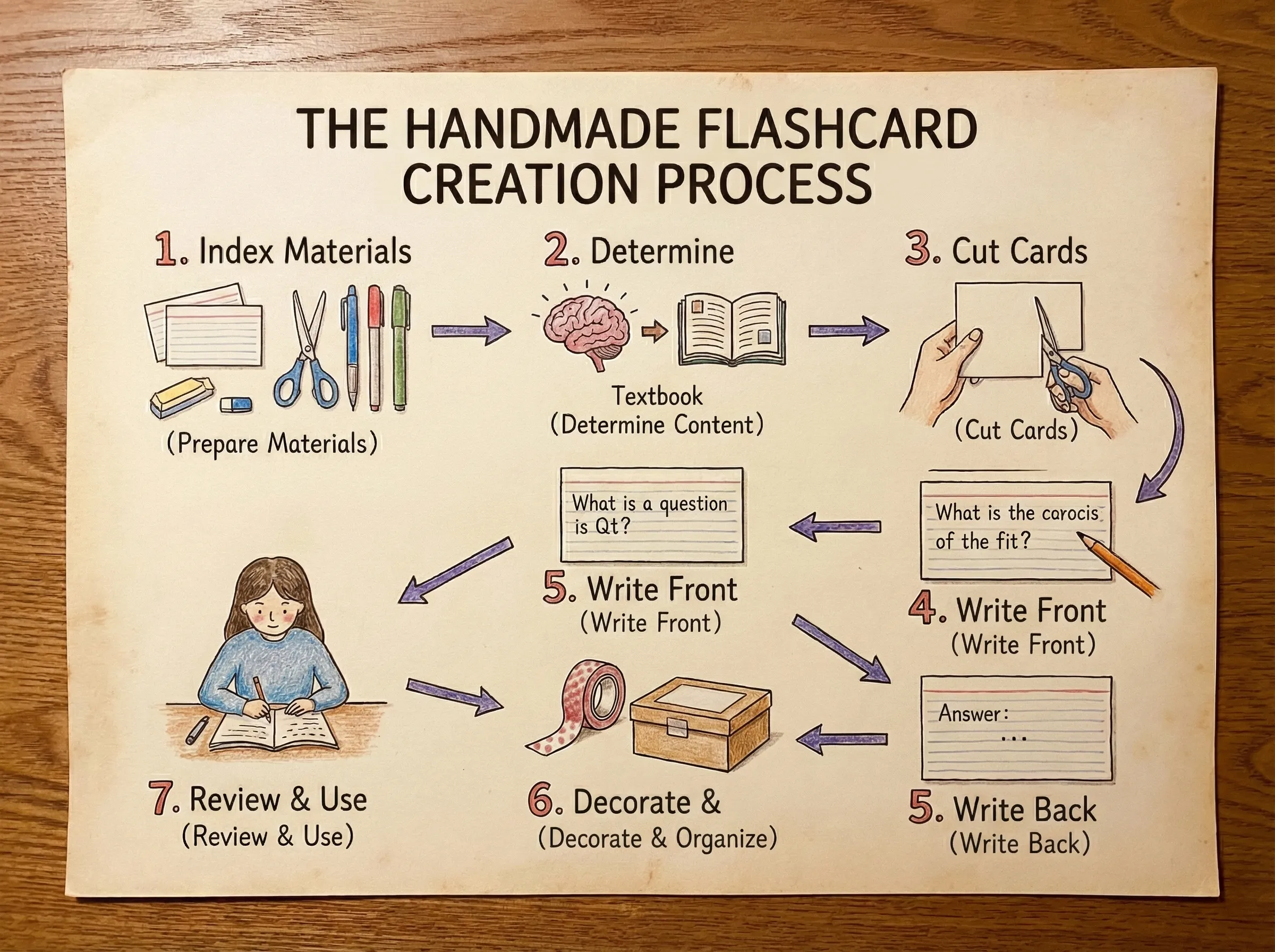
Traditional Flashcard Maker Process

Why Use an AI Flashcard Maker?

Making flashcards by hand takes a lot of time. The AI flashcard maker converts your notes and files into flashcards automatically.

Instead of spending hours writing cards, you can focus on actually studying. Use the AI Flashcard Maker to upload your materials and get flashcards ready to use.

What is an AI Flashcard Maker?

The AI Flashcard Maker is a free tool that creates flashcards from your study materials. Upload your files or paste text, and get flashcards ready to study.

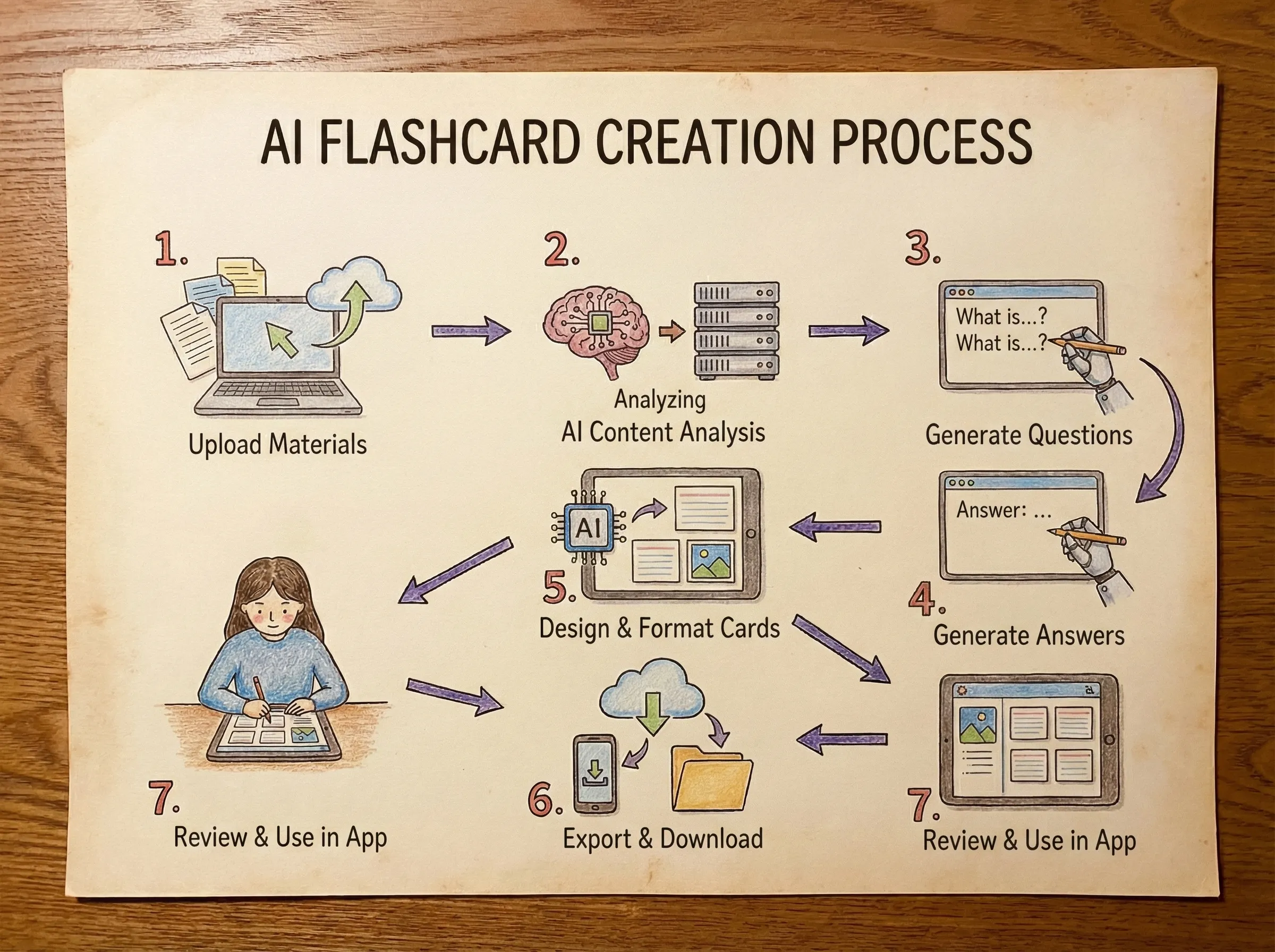
AI Flashcard Maker Process

How It Works

The AI flashcard maker reads your documents and extracts key information to create question-and-answer pairs. It works with PDFs, Word docs, text files, and Markdown.

Use the AI Flashcard Maker for exam prep, language learning, or any subject where flashcards help. Export your cards to use with other study tools or print them out.

Features

What you can do with the AI Flashcard Maker

Create Flashcards from PDF

Upload PDF files to the AI flashcard maker and get flashcards created from the content. Works with research papers, handouts, textbooks, and other PDF documents.

Support Multiple File Formats

The AI flashcard maker works with PDFs, Word documents (.doc, .docx), text files, and Markdown. You can also paste text directly if you prefer.

Question and Answer Format

The AI Flashcard Maker creates flashcards in a question-and-answer format to help with active recall. Review the front, try to remember the answer, then flip to check.

Convert Notes to Flashcards

Turn your lecture notes, study guides, or any text into flashcards using the AI flashcard maker. Upload your files or paste the content, and the tool will create cards for you.

Save in Learning Center

All your flashcards are saved in your Learning Center. Access them anytime to review or study.

Export Your Flashcards

Export flashcards as TXT, Markdown, Word, or PDF files, and export as Anki or Quizlet format in the Learning Center. You only need to export in the Learning Center.

Use Cases

Ways students use the AI Flashcard Maker to study

Input example (50–100 chars)

Photosynthesis uses sunlight, water, and carbon dioxide to produce glucose and oxygen in chloroplasts.

Output example (5 Q/A cards)

Card 1What 3 inputs are required for photosynthesis?
A: Sunlight, water, and carbon dioxide.
Card 2What are the two main outputs of photosynthesis?
A: Glucose and oxygen.
Card 3In which organelle does photosynthesis happen?
A: Chloroplasts.
Card 4Why is photosynthesis important to plants?
A: It produces glucose for energy and growth.
Card 5How does this process help other organisms?
A: It releases oxygen and supports food chains.

Why Use the AI Flashcard Maker

Works in Your Browser - The AI flashcard maker runs in your browser. No need to download anything. Just open the page and start creating flashcards.
Free to Use - The AI Flashcard Maker is completely free. Create flashcards from your documents at no cost. No hidden fees or subscriptions.
Saves Time - Instead of writing flashcards by hand, use the AI flashcard maker to upload your files and get them created automatically.
Easy to Use - The AI Flashcard Maker has a simple interface that anyone can figure out. Upload a file or paste text, click generate, and you're done.

Tips for Studying with Flashcards

Try to Remember First - Before flipping the card, try to recall the answer. This active recall helps you remember better than just reading.
Review Regularly - Don't just study once. Come back to your flashcards every few days to keep the information fresh.
Check for Accuracy - Make sure your flashcards are correct. If something looks wrong, fix it before you memorize it.
Mix It Up - Don't study the same cards in the same order every time. Shuffle them or study different topics.
Study in Short Bursts - 20-30 minutes at a time works better than long study sessions. Take breaks between sessions.
Add Context - Include examples or context in your flashcards. It's easier to remember information when you understand it.
Focus on What You Don't Know - Spend more time on cards you struggle with. Review the easy ones less often.

Frequently Asked Questions (FAQ)

Common questions about using the AI Flashcard Maker

How do I create flashcards with the AI Flashcard Maker?

Upload a PDF, Word document, text file, or Markdown file to the AI flashcard maker, or paste text directly. Click 'Generate Flashcards' and wait for your cards to be created.

What's the best way to study with flashcards from the AI Flashcard Maker?

Try to recall the answer before flipping the card. Review your flashcards regularly, and focus more on the ones you struggle with. You can export them from the AI flashcard maker to use with tools like Anki for spaced repetition.

What file formats does the AI Flashcard Maker support?

The AI flashcard maker supports PDFs, Word documents (.doc, .docx), text files (.txt), and Markdown files (.md). You can also paste text directly into the text input field.

How long can my text be in the AI Flashcard Maker?

Text input in the AI Flashcard Maker is limited to 2,500 characters. For longer content, upload a file instead.

Is this flashcard maker free?

Yes. The core flashcard generation flow is free, including note-to-Q&A conversion and editable card output.

Can I export my flashcards from the AI Flashcard Maker?

Yes, you can export flashcards from the AI flashcard maker as TXT, Markdown, Word, or PDF files, and export as Anki or Quizlet format in the Learning Center. You only need to export in the Learning Center.