
Google Gemini
Gemini student guide (2026): Learn how to use Google's AI assistant for academic writing, research, coding, and document analysis with Guided Learning mode
Usage Tips
Leverage Multimodal Capabilities
Gemini excels at understanding images, PDFs, and other media. Upload screenshots of problems, diagrams, or documents for analysis. Example: 'Explain this diagram' or 'What's wrong with this code?'
Use Long Context for Complex Tasks
Gemini supports up to 1M tokens. Upload entire research papers, long documents, or codebases for comprehensive analysis. This is perfect for literature reviews and code refactoring.
Enable Real-time Search for Current Information
Turn on 'Google Search' to get up-to-date information. This is crucial for research on recent events, current statistics, or latest academic findings.
Combine with Google Workspace
If you use Google Docs, Sheets, or Slides, Gemini integrates seamlessly. Use it to draft documents, analyze data, or create presentations directly in your workspace.
Use Structured Prompts for Better Results
Be specific about format and structure. Example: 'Create a research outline with 5 sections, each with 3 subsections, in APA format.'
How Students Use Gemini: Complete Guide
Google Gemini is a multimodal AI assistant developed by Google. This comprehensive guide teaches students how to use Gemini for academic research, code learning, document analysis, and multimodal learning. 🎓 College students can get Google AI Pro FREE for one year! Learn step-by-step how students use Gemini effectively.
📖 Quick Navigation: How Students Use Gemini
Who This Is For: Undergraduate students, graduate students, programming learners, students who need to process large amounts of learning materials
What Students Can Do with Gemini:
- 📝 Write papers, conduct research, organize literature
- 📄 Analyze PDFs, charts, code screenshots
- 💻 Debug code, learn programming
- 📊 Use AI assistance directly in Google Docs/Sheets/Slides
- 🎨 Generate learning posters, vocabulary cards, and other visual materials
Fastest Path to Learn How Students Use Gemini:
- First time learning how students use Gemini? → Just read “How Students Use Gemini: Quick Start Guide” + first 3 scenarios in “How Students Use Gemini: Educational Application Scenarios”
- Need to write a paper? → Go directly to “Academic Research and Paper Writing” + “Case 1”
- Preparing for exams? → Read “Document Analysis and Summarization” + “Case 2/4”
- Creating presentations? → Read “AI Image Generation and Educational Visualization” + extension tools
How Students Use Gemini: Quick Start Guide
Suitable for: Students new to Gemini, complete basic setup in 3 minutes
How students use Gemini: Overall process: Select mode → Choose model → Upload materials → Ask proper questions
- 🎓 Claim Your Free Pro Plan: If you’re a college student, visit gemini.google/subscriptions to get Google AI Pro FREE for one year
- Access Gemini: Visit gemini.google.com or access through your Google account
- Select Guided Learning Mode: Choose the Guided Learning mode in the Gemini interface
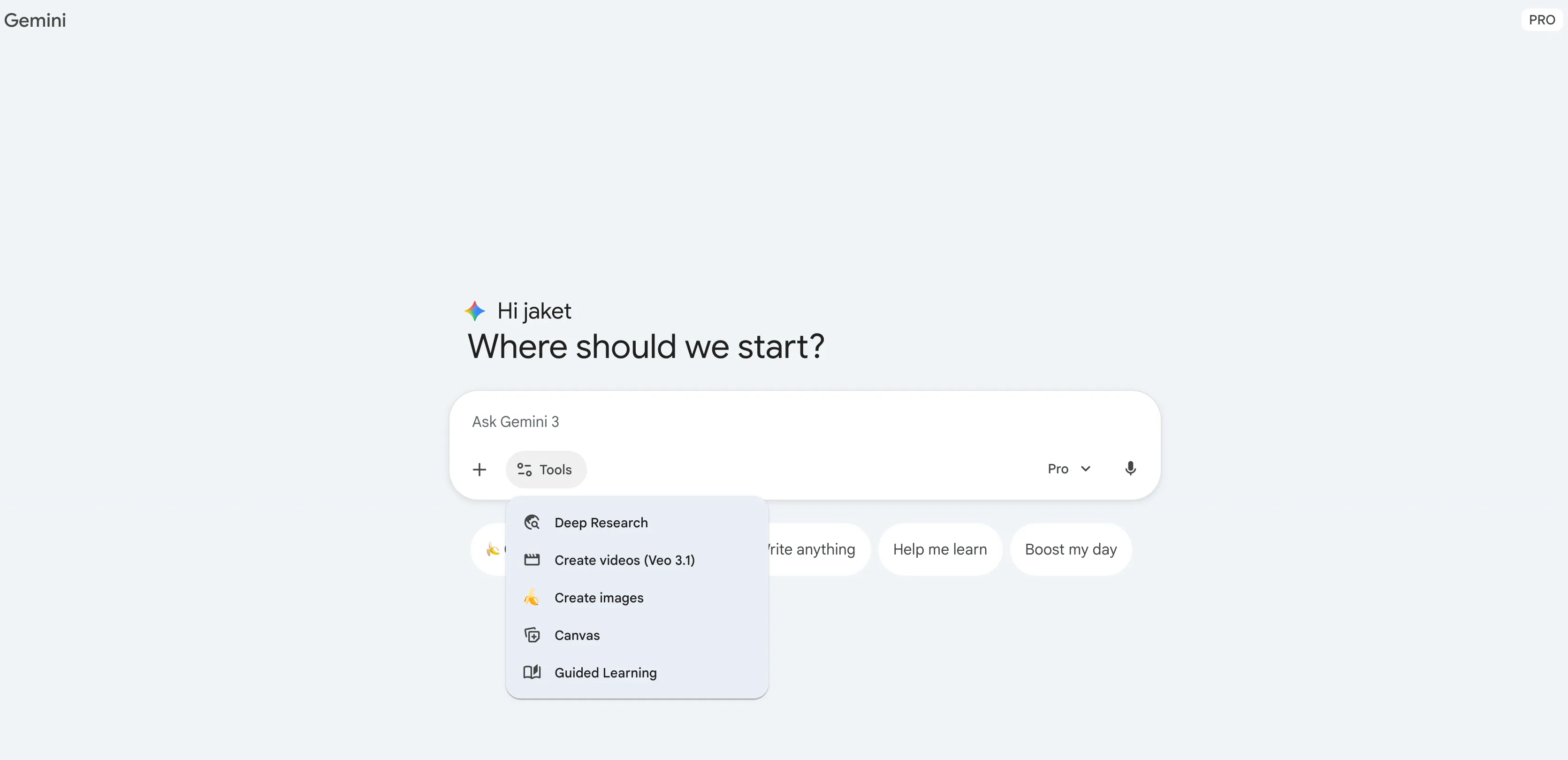
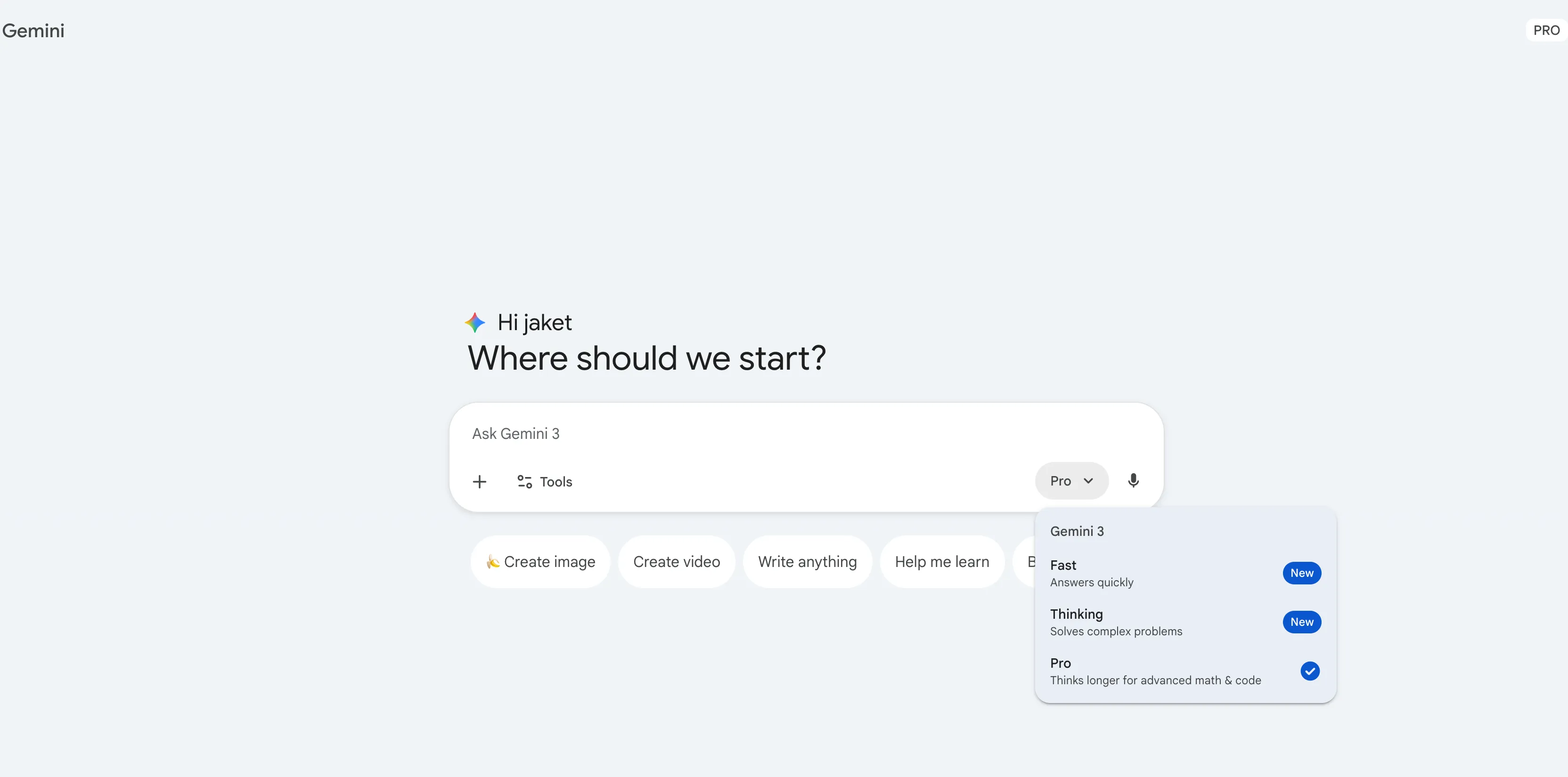
- Choose Model: Select the appropriate Gemini 3 model from the dropdown menu next to the input field:
- Fast: Answers quickly, suitable for simple questions and daily conversations
- Thinking: Solves complex problems, suitable for learning scenarios requiring in-depth analysis
- Pro: Thinks longer for advanced math & code, suitable for complex academic research and programming tasks
- Upload Learning Materials: Upload your study materials in various formats:
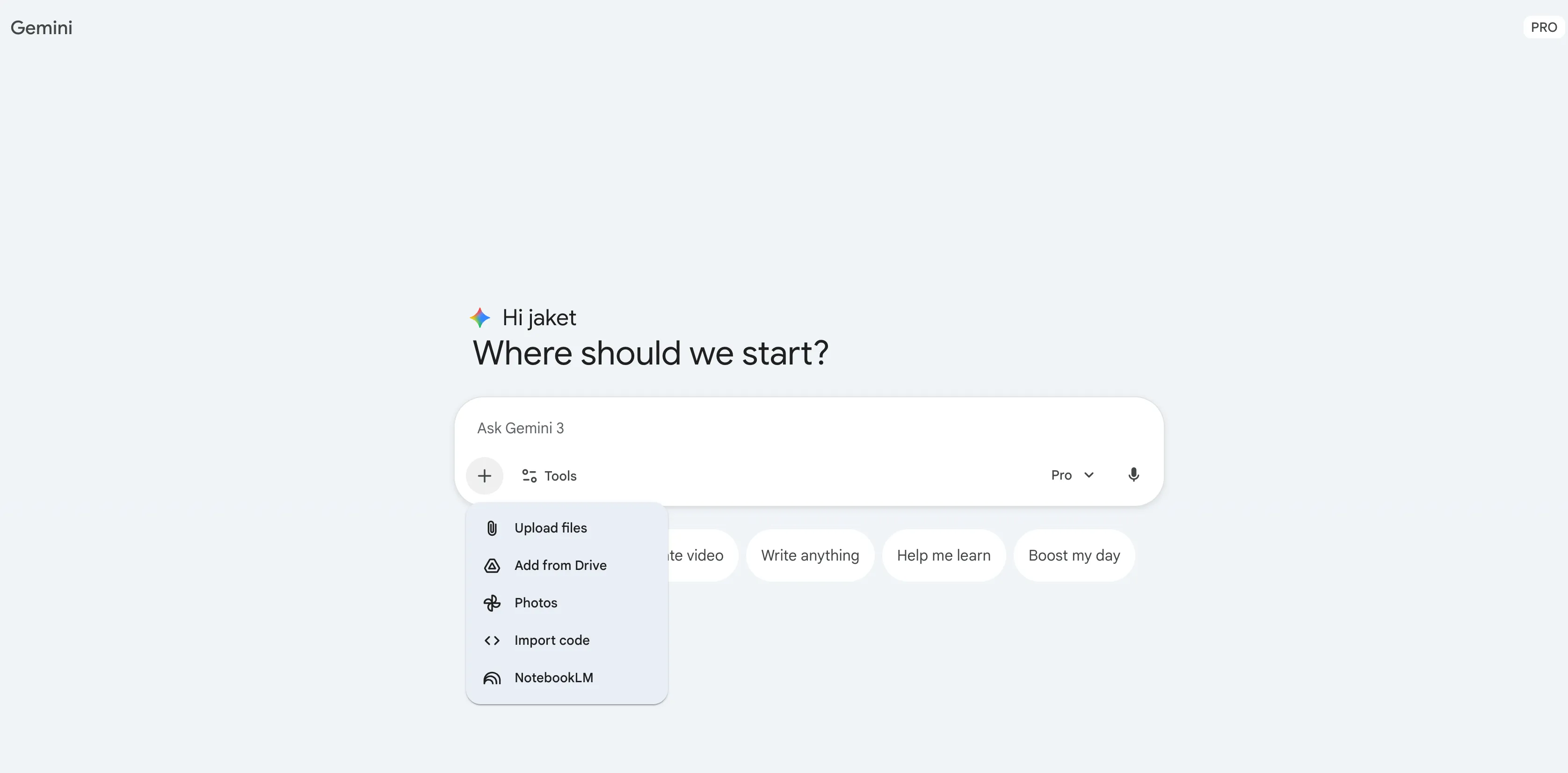
- Text files (.txt, .md, etc.)
- PDF documents
- Word documents (.doc, .docx)
- Image files (.jpg, .png, etc.)
- Other supported document formats
- Ask Proper Questions: Based on the uploaded materials, ask Gemini specific learning questions, such as:
- “Please explain the core concepts in this document”
- “What does this chart illustrate?”
- “Help me summarize the main points of this paper”
- “How should I solve this problem?”
- Engage Deeply: Continue asking questions based on Gemini’s responses to deepen your understanding
- Build Learning Habits: Develop a learning workflow using the Guided Learning mode
How Students Use Gemini: Core Advantages
Suitable for: Students who want to understand how to use Gemini and its advantages compared to other AI tools
Gemini’s unique advantages compared to other AI assistants:
- Multimodal Understanding: Can process text, images, PDFs, audio, and video simultaneously, especially suitable for analyzing charts, code screenshots, and math formulas
- Ultra-Long Context: Supports up to 1 million tokens, allowing you to upload entire research papers or complete codebases for comprehensive analysis
- Real-time Search: Integrated Google Search to get the latest information and statistical data
- Workspace Integration: Seamlessly integrates with Google Docs, Sheets, and Slides, allowing direct use of AI assistance in documents
When Should Students Use Gemini?
- Need to analyze images, PDFs, or code screenshots → Students use Gemini’s multimodal capabilities
- Need to process long documents or codebases → Students use Gemini’s ultra-long context
- Need latest information or statistical data → Students use Gemini’s real-time search
- Using Google Workspace for learning → Students use Gemini’s integration advantages
Key Differences from ChatGPT:
| Feature | Gemini | ChatGPT |
|---|---|---|
| Multimodal Capabilities | ✅ Strong image, PDF, video understanding | ✅ Supported but relatively weaker |
| Context Length | ✅ Up to 1M tokens | ✅ ~128K tokens |
| Real-time Search | ✅ Integrated Google Search | ✅ Supports web search |
| Workspace Integration | ✅ Seamless Google app integration | ❌ Not supported |
| Student Discount | ✅ Free Pro for one year | ✅ Go ~$8/month (region-dependent) |
How Students Use Gemini: Core Features Guide
Suitable for: Students who have started using Gemini and want to learn how to use it more effectively
When to Use:
- Frequently need to view PDFs + lecture screenshots → Focus on “Multimodal Capabilities”
- Need to process entire papers or codebases → Focus on “Ultra-Long Context”
- Need latest data for research → Focus on “Real-time Search”
- Using Google Workspace for learning → Focus on “Workspace Integration”
How Students Use Gemini: Multimodal Capabilities
When students use Gemini, they can leverage its strength in understanding multiple media types, which is its core advantage over other AIs.
Use Cases:
- Image Analysis: Upload charts, diagrams, math formulas, code screenshots for analysis
- Document Processing: Upload complete documents like PDF, Word, PPT for summarization and analysis
- Combined Use: Upload multiple related files simultaneously for comprehensive analysis
Steps:
- Click the upload button in the conversation
- Select the file to upload (image, PDF, code file, etc.)
- Describe your learning objective or question
- Gemini will automatically analyze and provide detailed explanations
Example:
- ❌ Bad: “Help me understand this chart” (without uploading the chart)
- ✅ Good: [Upload chart] “Please explain this data chart about climate change in detail, including trend analysis and key findings”
How Students Use Gemini: Ultra-Long Context Window
When students use Gemini, they can take advantage of its support for up to 1 million tokens of context, which is a powerful advantage for processing long documents and codebases.
Applicable Scenarios:
- Upload entire research papers for analysis and summarization
- Upload complete codebases for refactoring suggestions and architecture analysis
- Upload multiple related documents for comparison analysis
- Conduct long conversations without losing context
Steps:
- Directly upload long documents or code files
- Specify analysis requirements
- Gemini will provide comprehensive analysis based on the entire document content
Example:
I uploaded 3 research papers about machine learning.
Please:
1. Compare the research methods of these three papers
2. Find commonalities and differences
3. Summarize research trends in this field
4. Point out future research directions
How Students Use Gemini: Real-time Search for Latest Information
When students use Gemini for research requiring the latest data, real-time search is crucial.
Use Cases:
- Research current events or trends
- Get latest statistical data
- Learn about latest academic discoveries
- Verify information timeliness
Steps:
- Click the “Google Search” toggle in the conversation
- Ask questions requiring the latest information
- Gemini will automatically search and integrate results
How Students Use Gemini: Google Workspace Integration
When students use Gemini, they can access it directly in Google Docs, Sheets, and Slides, essentially adding an “AI sidebar” on the right side of your documents, spreadsheets, and presentations. It helps students write content, rewrite and polish text, summarize materials, and generate images and formulas/charts—all without switching back and forth to a separate chat window.
How to Use Gemini in Google Docs
How to Access:
- Open any Google Docs
- Click “Ask Gemini” in the top right corner
- A sidebar will appear on the right
Common Features:
- Draft/Rewrite Text: Emails, reports, paper paragraphs, etc.
- Summarize Documents: Summarize entire documents, other files in Drive, or Gmail email content
- Generate Content: Generate or rewrite image captions, titles, summaries, and insert them with one click at the cursor position
How to Use Gemini in Google Sheets
How to Access:
- Open Google Sheets
- Click “Ask Gemini” in the top right corner
- Use the sidebar to chat with it
Common Uses:
- Generate Table Structure: Generate table structures and sample data based on your needs
- Auto-Write Formulas: Automatically write complex formulas (e.g., “apply 15% discount to this column and round”), or explain what a formula does
- Data Analysis: Summarize or analyze selected data ranges, help you think about KPIs, categories, and next analysis steps
How to Use Gemini in Google Slides
How to Access:
- Open Google Slides
- Click “Ask Gemini” in the top right corner
- A sidebar will appear
What You Can Do:
- Generate Content: Generate entire outlines or slide content based on a single prompt
- Generate Images: Use text descriptions to generate illustrations and background images (AI images), then insert them into the current slide
- Summarize Presentations: Summarize entire presentations, generate speech scripts, talking points, or closing summaries
Requirements Before Use
Account Requirements:
- Requires an eligible Google Workspace subscription (e.g., Workspace plan with Gemini) or Google One AI Premium / Google AI plan
- Free accounts in some regions can also access sidebar Gemini through trial/experimental programs
General Access Method: Find the “Ask Gemini” button at the top or top right of Docs/Sheets/Slides → Open sidebar → Give instructions in natural language → Insert satisfactory content into documents/spreadsheets/slides
How Students Use Gemini: Educational Application Scenarios
Suitable for: Students who want to learn how to use Gemini for different learning tasks
Each scenario includes: applicable situations, operational steps, and ready-to-use question templates
1. Academic Research and Paper Writing
Applicable Scenarios:
- Literature review and data collection
- Research outline development
- Paper structure and format optimization
- Citation format verification
- Real-time information retrieval
Steps:
- Define research topic and objectives
- Enable Google Search to get the latest materials
- Upload relevant papers or documents for analysis
- Ask Gemini to generate a research outline
- Gradually refine each section
- Self-review and edit to ensure academic integrity
Example Prompt:
I need to write a research paper about "Applications of Artificial Intelligence in Education."
Please help me:
1. Search for the latest relevant research and statistical data
2. Generate a detailed outline with 5 main sections
3. Provide 3-5 key arguments for each section
2. Multimodal Learning (Image and PDF Analysis)
Applicable Scenarios:
- Chart and diagram explanations
- Math problem and formula recognition
- Code screenshot analysis
- PDF document summarization
- Experimental data visualization analysis
Steps:
- Upload images, PDFs, or screenshots
- Describe your learning objectives
- Request detailed explanations or analysis
- Ask questions about parts you don’t understand
- Request related practice questions or extended learning
Example Prompt:
I uploaded a diagram about photosynthesis.
Please:
1. Explain each part of the diagram in detail
2. Describe the steps of the entire process
3. Provide related practice questions
3. Code Learning and Debugging
Applicable Scenarios:
- Code error debugging
- Algorithm explanation and optimization
- Programming assignment guidance
- Code review and improvement suggestions
- Multi-language code conversion
Steps:
- Upload code files or screenshots
- Describe the problem or learning objective
- Get detailed explanations and solutions
- Request optimization suggestions
- Learn related concepts and best practices
Example Prompt:
I uploaded a Python code snippet, but it throws an error when running.
Please:
1. Find the cause of the error
2. Provide the corrected code
3. Explain why this error occurred
4. Provide suggestions to avoid similar errors
4. Document Analysis and Summarization
Applicable Scenarios:
- Quick understanding of long documents
- Course material summarization
- Meeting notes organization
- Multi-document comparison analysis
- Key information extraction
Steps:
- Upload documents (PDF, Word, text, etc.)
- Specify analysis objectives
- Get summaries and key points
- Ask in-depth questions about specific sections
- Generate study notes or mind maps
Example Prompt:
I uploaded a 50-page research paper.
Please:
1. Summarize the core viewpoints and conclusions
2. Extract key data and statistical information
3. List the main research methods
4. Point out possible limitations
5. Real-time Information Retrieval and Learning
Applicable Scenarios:
- Current event research
- Latest statistical data queries
- Real-time news analysis
- Latest academic discovery updates
- Dynamic information tracking
Steps:
- Enable Google Search functionality
- Ask questions requiring the latest information
- Get real-time search results
- Request comparison of multiple sources
- Verify information reliability
Example Prompt:
Please search and tell me:
1. The latest data on the global online education market size in 2024
2. Predictions from major research institutions
3. Growth trends in different regions
6. AI Image Generation and Educational Visualization (Advanced)
Suitable for: Students and teachers who need to create presentations, posters, and learning material layouts
Applicable Scenarios:
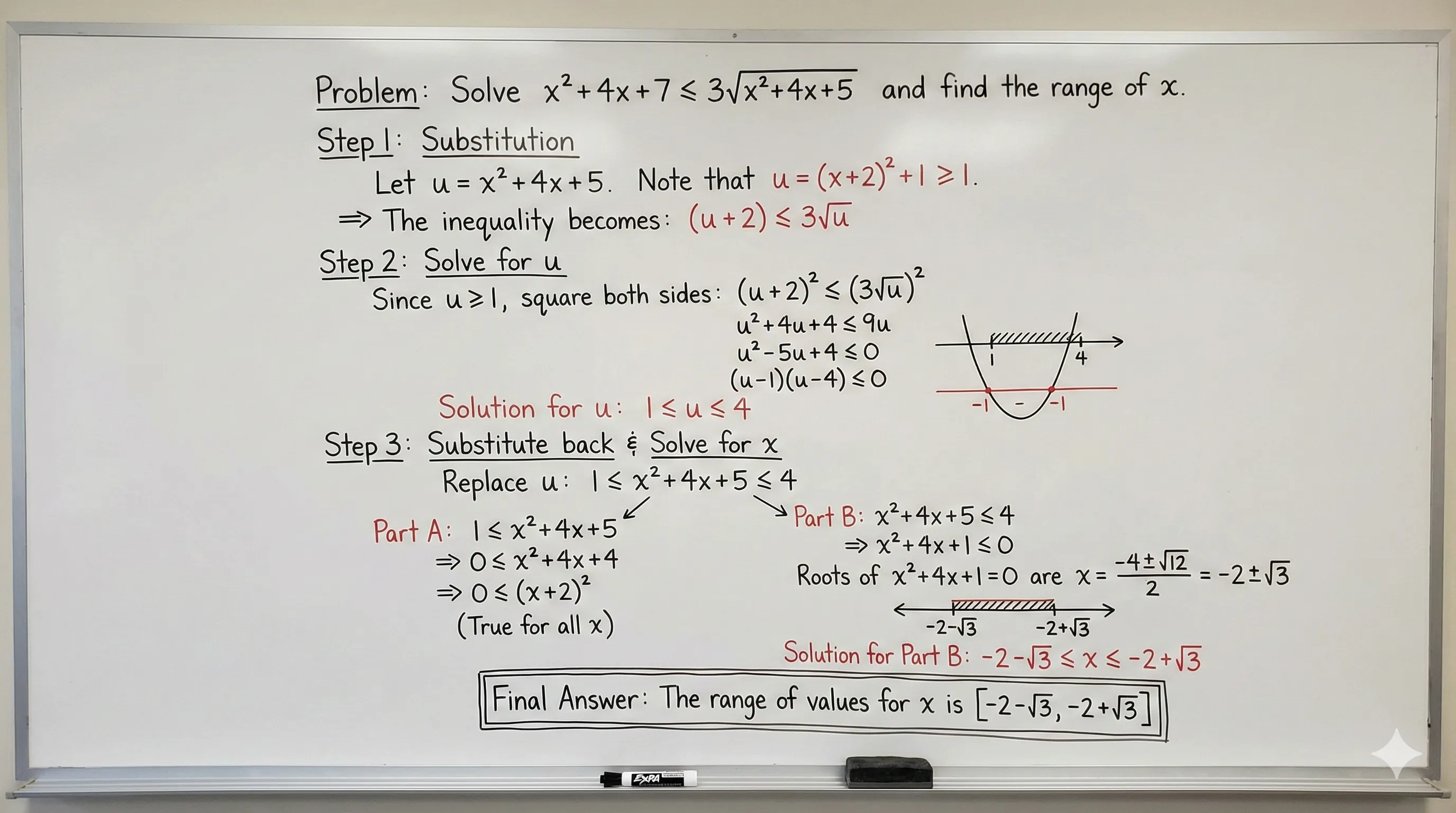
- Generate visual charts for math problem-solving steps
- Create educational posters and learning material illustrations
- Produce course presentation images and diagrams
Basic Operations:
- Select image generation feature in Gemini
- Describe the image you need (e.g., “generate a visual chart of quadratic equation solving steps”)
- Insert the generated image into Google Docs or study notes
Extension Tools (Optional):
If you need more professional prompts and templates, you can use the following tools:
-
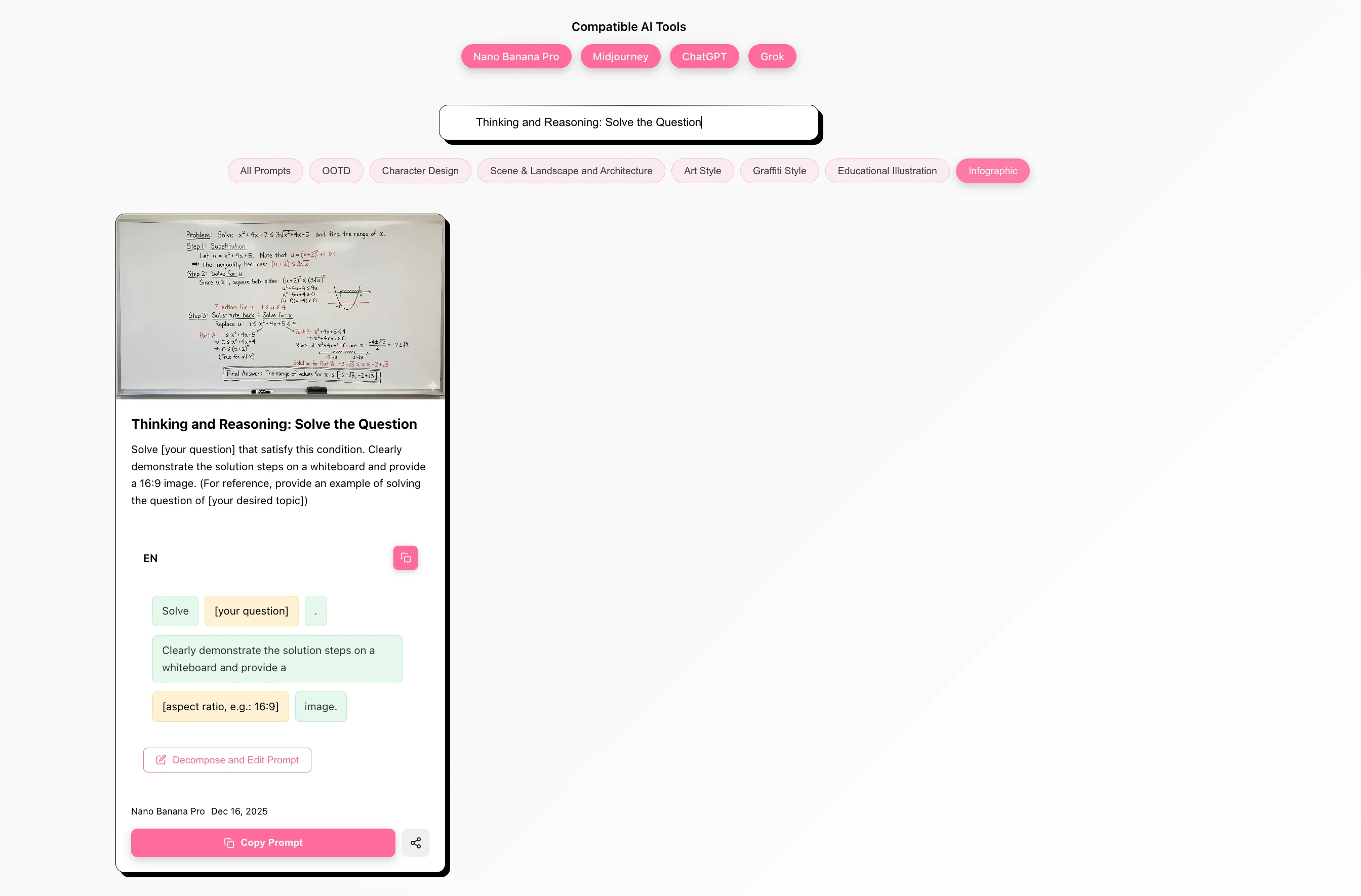
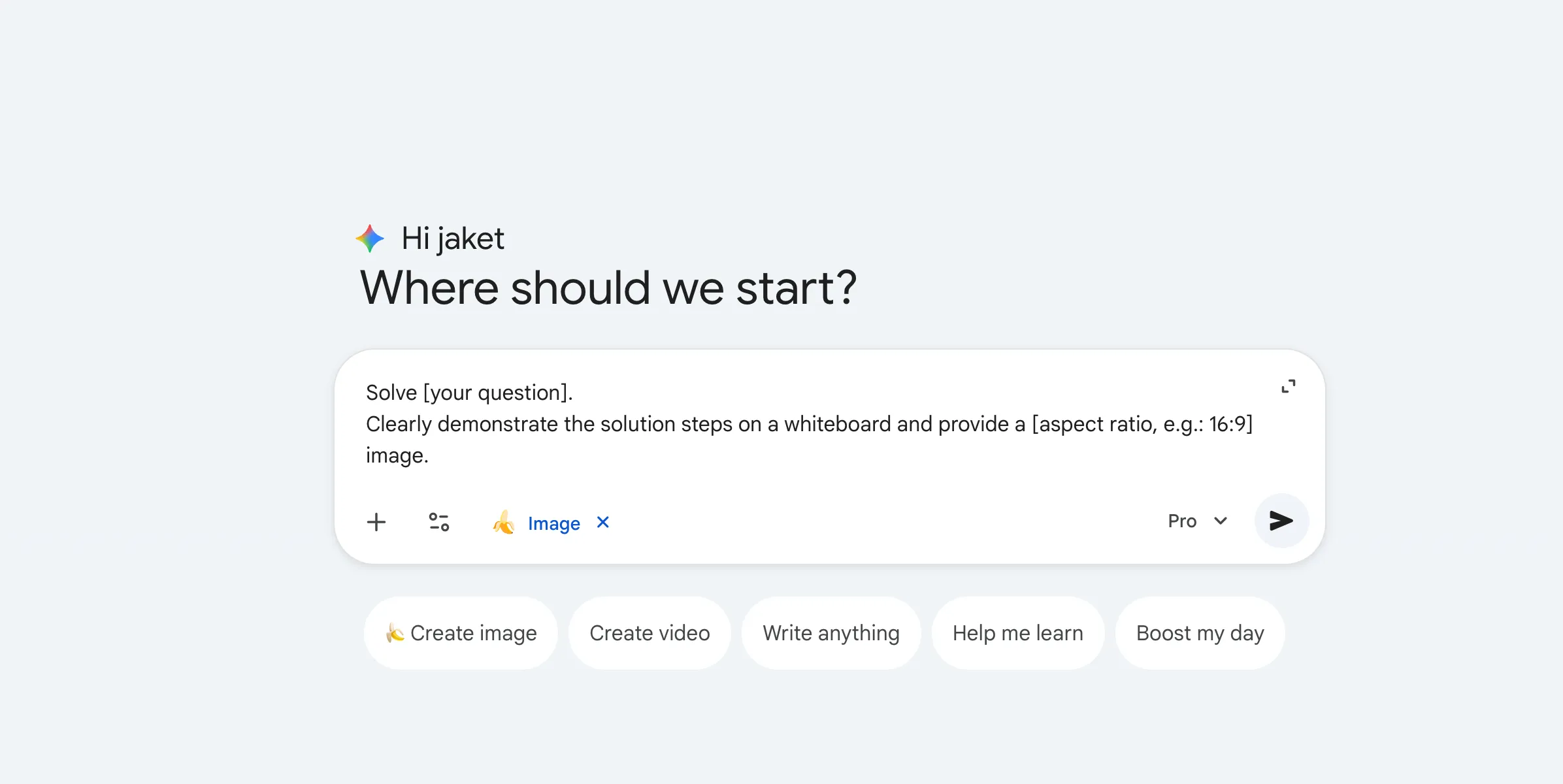
Nano Banana Prompts: High-quality AI image generation prompt library, including educational illustrations, infographics, and other categories
- Usage example: Search for “solve the question” → Copy prompt → Paste to Gemini → Generate math problem-solving chart
-
AI Prompt Generator: Quickly generate vocabulary learning card prompts
- Usage example: Select template → Input vocabulary → Generate prompt → Copy to Gemini → Generate learning poster
- Supports multiple art styles (vector picture book style, 3D clay style, etc.) and formats (A4, square, etc.)
Prompt Resources:
- For more advanced features, visit: Nano Banana Prompts | AI Prompt Generator
- Compatible with Gemini, Midjourney, ChatGPT, Grok, and other mainstream AI image generation tools
7. Gemini Practical Tips (Advanced)
Tip 1: Choose Pro model first for complex concept visualization
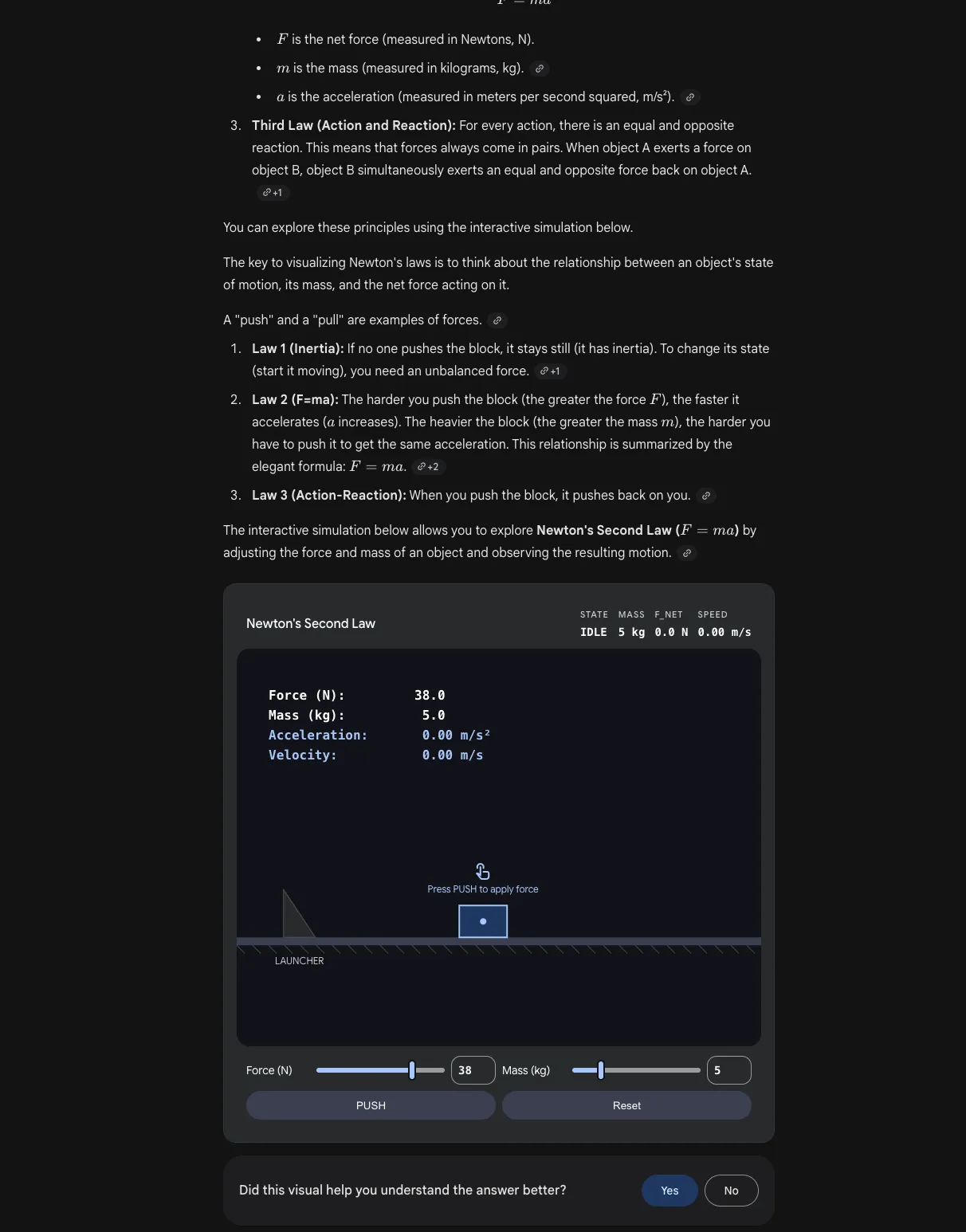
When explaining abstract or dynamic ideas (like Newton’s Three Laws), switch to Gemini 3 Pro first, then use phrases like show me or help me visualize to trigger clearer educational visuals.
- Case image (Newton’s Three Laws visualization demo):
- Write prompts with clear constraints: audience level, output format, step-by-step structure, and animation-like style
Copy-ready Prompt Example:
You are my physics tutor. I am a high school student.
Help me visualize Newton's Three Laws with one unified scene and 3 separate mini-scenes.
Please:
1. Show me each law with a concrete everyday example
2. Explain what forces are acting in each scene
3. Add simple labels I can copy to my slides
4. Give me a short Chinese + English version for presentation notes
Tip 2: Drop any YouTube video into Gemini for study notes
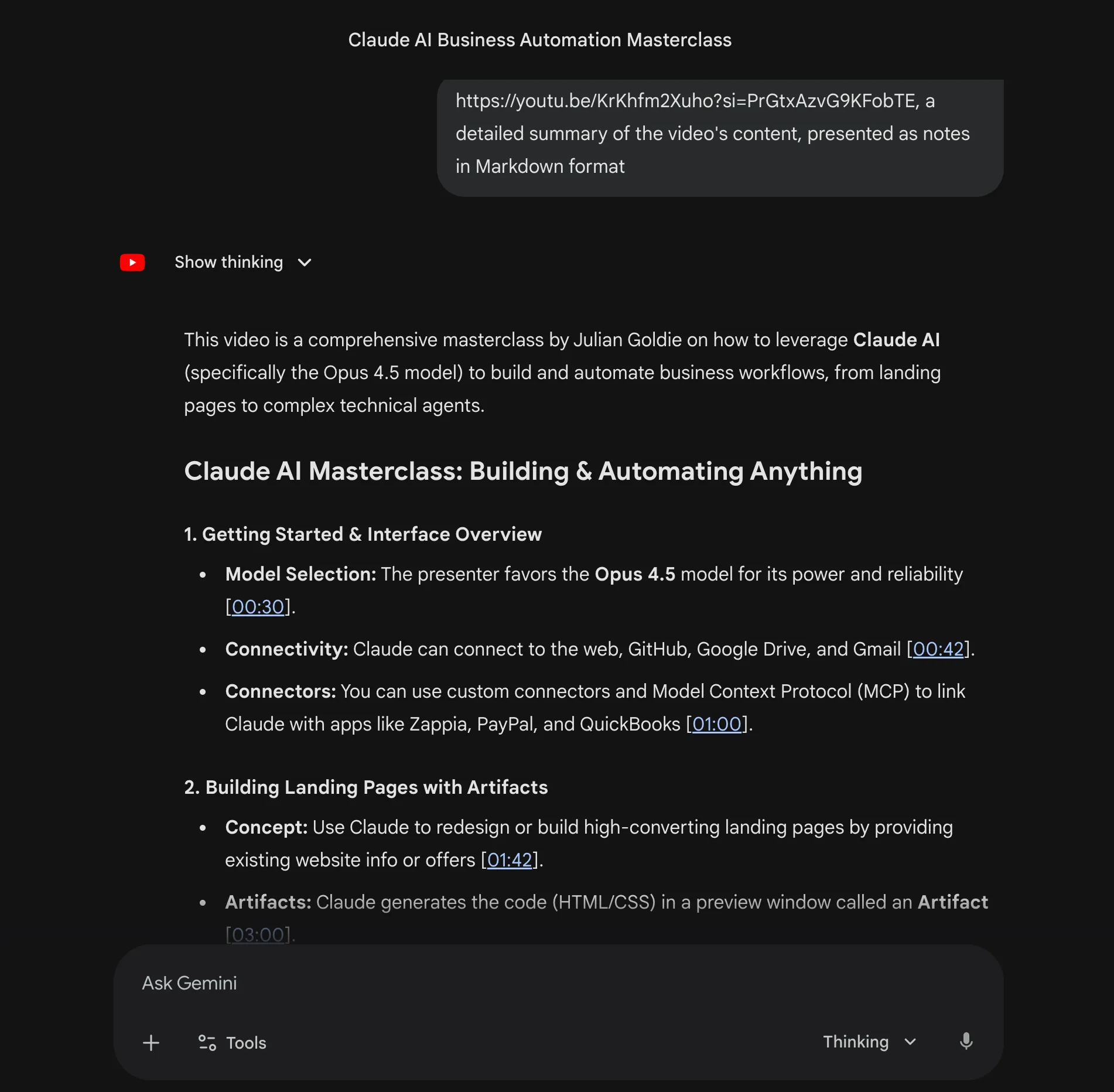
You can paste any YouTube link directly into Gemini and ask for structured notes. This works well for pre-class preparation and post-class review.
Case image (YouTube video summary study notes):
Steps:
- Paste a YouTube video link in Gemini
- Tell Gemini your learning goal (exam prep, class presentation, concept mapping)
- Ask for a fixed output format (summary, key points, term explanations, review checklist)
Copy-ready Prompt Example:
Here is a YouTube video link: [paste link]
Please generate study notes for me:
1. Summarize the core content in around 150 words
2. Extract 5-8 key knowledge points (one sentence each)
3. List important terms used in the video and explain them simply
4. Create a "10-minute review checklist" for quick exam revision
Educational Scenario Case Studies
Case 1: Research Paper Writing
Scenario: Need to write a research paper about “Online Education Effectiveness”
Process:
- Enable Search: Get latest research data and statistics
- Upload Papers: Upload 3-5 related research papers
- Generate Outline: “Based on these papers, create a research outline with 6 sections”
- Gradually Refine: For each section, request detailed arguments and evidence
- Format Check: “Please check if this outline meets APA format requirements”
- Self-Edit: Write based on the outline yourself to ensure originality
Case 2: Math Problem Image Recognition
Scenario: Encounter a complex math problem and need help understanding
Process:
- Take Photo: Upload screenshot or photo of the math problem
- Request Explanation: “Please explain the problem-solving approach and steps”
- Step-by-step Guidance: “Please show the solution process step by step”
- Extended Learning: “Please provide similar practice problems”
- Concept Understanding: “Please explain the core math concepts involved in this problem”
Case 3: Code Project Analysis
Scenario: Need to understand the code structure of an open-source project
Process:
- Upload Code: Upload the entire project or key files
- Structure Analysis: “Please analyze the code structure and architecture of this project”
- Function Explanation: “Please explain the role of main functional modules”
- Improvement Suggestions: “Please provide code optimization and refactoring suggestions”
- Learning Path: “If I want to learn this project in depth, where should I start?”
Case 4: Multi-Document Comparison Analysis
Scenario: Need to compare multiple related research papers
Process:
- Upload Documents: Upload 3-5 related papers
- Comparison Analysis: “Please compare the research methods, conclusions, and contributions of these papers”
- Find Differences: “What are the main points of disagreement in these studies?”
- Summarize Trends: “What are the research trends in this field?”
- Generate Review: “Please generate a literature review outline”
Subscription Plan Selection Guide
Google offers multiple Gemini subscription plans, with college students getting Google AI Pro FREE for one year!
🎓 Free for Students - Google AI Pro (One Year)
Price: FREE for college students for one year (normally $19.99/month)
How to Get: Visit gemini.google/subscriptions and verify your student status
Core Features (Most Important for Students):
- Higher access to Gemini 3 Pro: More frequent access to Google’s most intelligent model
- Deep Research: Analyze hundreds of sources to answer complex questions
- Image/Video Generation: Create and edit images, generate videos
- 1,000 monthly AI credits: 10x more credits than Free tier
- NotebookLM: Research and writing assistant with 5x more Audio Overviews and notebooks
- Gemini in Gmail, Docs, Vids: Access Gemini directly in Google apps
- Storage: 2 TB total storage
Suitable for: College students who want premium features at no cost
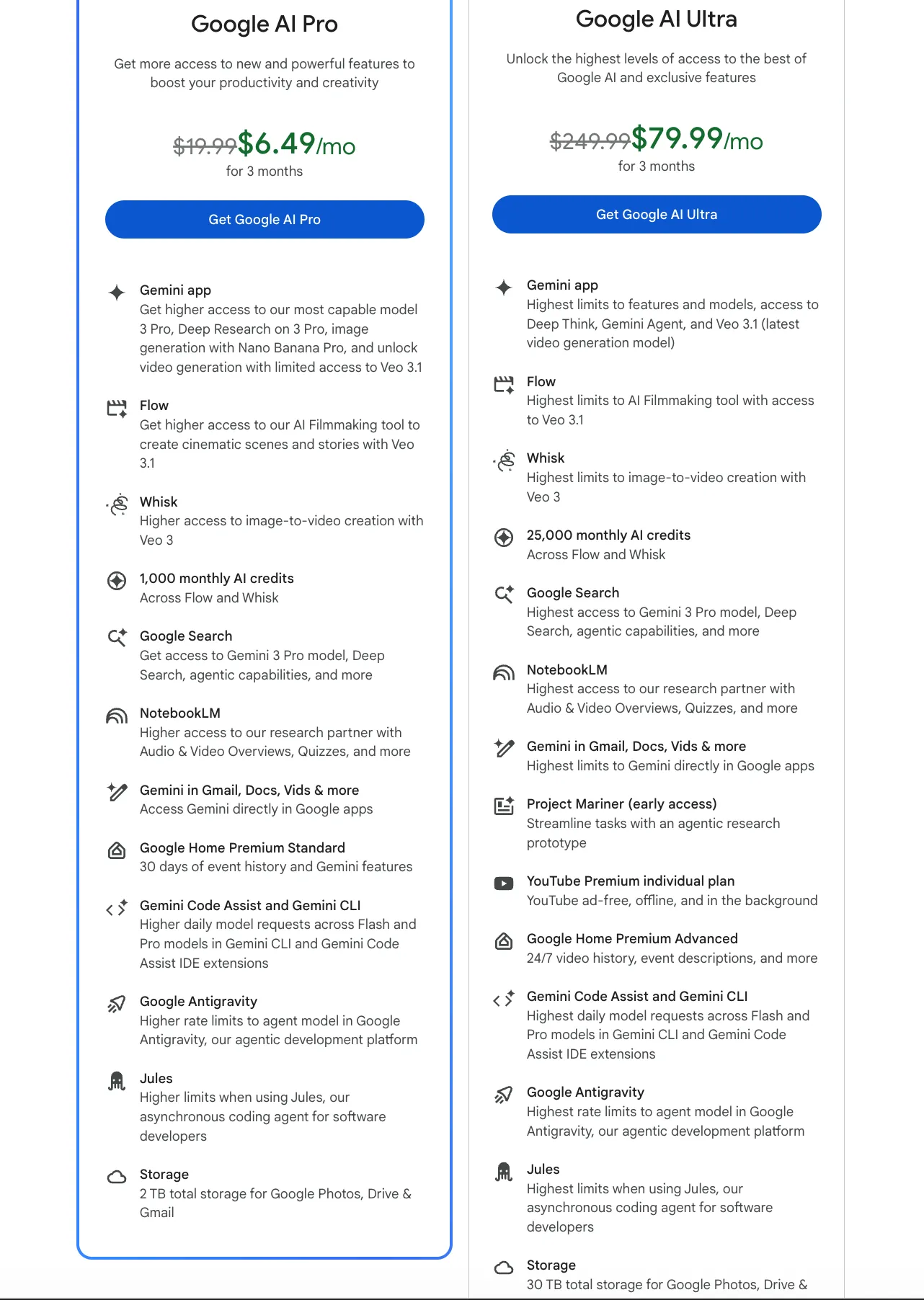
Feature Comparison Table
| Feature | Free | Google AI Pro ($19.99/mo) | Google AI Ultra ($249.99/mo) |
|---|---|---|---|
| Gemini 2.5 Flash | ✅ | ✅ | ✅ |
| Gemini 3 Pro Access | ✅ Limited | ✅ Higher | ✅ Highest |
| Image Generation | ✅ | ✅ Enhanced | ✅ Highest |
| Video Generation | ✅ Limited | ✅ Higher | ✅ Highest |
| Deep Research | ✅ | ✅ Enhanced | ✅ Enhanced |
| Monthly AI Credits | 100 | 1,000 | 25,000 |
| NotebookLM | ✅ | ✅ 5x more | ✅ Highest |
| Gemini in Gmail/Docs | ❌ | ✅ | ✅ Highest |
| Storage | 15 GB | 2 TB | 30 TB |
Which Plan Should Students Choose?
-
🎓 Free for Students (Google AI Pro): Best option for college students! Get Google AI Pro completely free for one year. This includes higher access to Gemini 3 Pro, Deep Research, image/video generation, 1,000 monthly credits, and 2 TB storage. Perfect for academic research, paper writing, and creative projects.
-
Free Tier: Great starting point if you’re not a college student or want to try Gemini first. Provides solid multimodal capabilities and basic features.
-
Google AI Pro: If you’re not eligible for the student discount or need more after your free year ends, this plan offers excellent value for students doing in-depth research.
-
Google AI Ultra: Generally not necessary for most students unless you’re doing professional research or development work requiring maximum capabilities.
Important Notes
⚠️ Academic Integrity
- Do not submit AI-generated content directly: Must be understood and modified by yourself
- Follow school policies: Understand your institution’s regulations on AI tool usage
- Cite AI assistance: If required by your school, must indicate AI tool usage
- Maintain originality: Use AI as an auxiliary tool, not a replacement for thinking
⚠️ Information Accuracy
- Verify important information: Especially data, dates, names, statistics, etc.
- Cross-verify: Compare multiple sources to confirm information
- Check timeliness: Use real-time search to get the latest information
- Consult authorities: Consult teachers or experts for critical questions
⚠️ Reasonable Use
- As a learning tool: For understanding, inspiration, and assistance, not replacing thinking
- Maintain critical thinking: Keep questioning and verifying AI responses
- Improve your own abilities: The ultimate goal is to enhance your learning capabilities
- Protect privacy: Do not upload documents containing sensitive information
Summary: How Students Use Gemini
This guide has shown you how students use Gemini effectively. Google Gemini is a powerful multimodal AI assistant in the educational field, particularly suitable for learning scenarios that need to process images, documents, and code. Core advantages include:
- Multimodal Understanding: Can process text, images, audio, video, and other media simultaneously
- Ultra-Long Context: Supports processing entire papers, complete codebases, and other long documents
- Real-time Search: Integrated Google Search to get the latest information
- Workspace Integration: Seamless integration with Google ecosystem
The core principle for how students use Gemini is: Use it to enhance learning, not replace learning. By fully leveraging multimodal capabilities, long context windows, and real-time search features when students use Gemini, they can significantly improve learning efficiency and understanding depth.
💡 Recommended Paths: How Students Use Gemini
- First time learning how students use Gemini? → Start with “How Students Use Gemini: Quick Start Guide” to complete basic setup
- Need to write a paper? → Learn how students use Gemini for “Academic Research and Paper Writing” + “Case 1: Research Paper Writing”
- Preparing for exams? → See how students use Gemini for “Document Analysis and Summarization” + “Case 2: Math Problem Image Recognition” or “Case 4: Multi-Document Comparison Analysis”
- Learning programming? → Discover how students use Gemini for “Code Learning and Debugging” + “Case 3: Code Project Analysis”
- Creating presentations/posters? → Learn how students use Gemini for “AI Image Generation and Educational Visualization” + extension tool links
🎓 Special Student Offer
For college students: Get Google AI Pro FREE for one year - this is the best option! It includes higher access to Gemini 3 Pro, Deep Research, image/video generation, 1,000 monthly credits, and 2 TB storage. Perfect for academic research, paper writing, and creative projects.
For non-students or after your free year, the Free Tier provides powerful features that meet most daily learning needs. For advanced research, consider Google AI Pro ($19.99/month) or Google AI Ultra ($249.99/month) for maximum capabilities.
Use Cases
- Academic research and paper writing
- Image-based learning and analysis
- Code learning and debugging
- Multilingual translation and learning
- Document analysis and summarization
- Real-time information retrieval
- Creative writing and brainstorming
Key Features
- Multimodal understanding (text, images, audio, video)
- Long context window (up to 1M tokens)
- Real-time web search integration
- Code generation and debugging
- File upload and analysis
- Google Workspace integration
- Free tier with generous limits
Pros
- Free tier with generous limits
- Excellent multimodal capabilities
- Very long context window
- Real-time web search
- Google Workspace integration
- Fast response times
- Supports multiple languages
Cons
- May generate inaccurate information
- Requires fact-checking
- Some features require paid tier
- Limited customization options
Frequently Asked Questions
Is Gemini free for students?
Yes! College students can get Google AI Pro completely FREE for one year (normally $19.99/month). Visit gemini.google/subscriptions to verify your student status. There's also a free tier available for everyone with generous limits.
What makes Gemini different from ChatGPT?
Gemini excels at multimodal understanding (images, audio, video), has a much longer context window (up to 1M tokens), integrates with Google services, and offers real-time web search. It's particularly strong for research and document analysis.
Can I upload files to Gemini?
Yes, Gemini supports file uploads including PDFs, images, audio, video, and various document formats. You can upload entire research papers or codebases for analysis.
How accurate is Gemini?
Gemini is generally accurate but can make mistakes, especially with specialized knowledge or recent events. Always fact-check important information, especially when using it for academic work.
Can I use Gemini for academic writing?
Yes, but use it responsibly. Gemini can help with research, outlining, and drafting, but you should always review and edit the content yourself. Check your institution's policies on AI tool usage.
Why are Gemini's answers inaccurate?
Gemini's answers can be inaccurate due to several reasons: training data may be outdated, the model may produce hallucinations (fabricated information), and it has limited understanding of specialized fields. Solutions: enable Google Search to get the latest information, cross-verify critical information (data, dates, names), prioritize authoritative sources, and maintain skepticism about uncertain information.
How to avoid over-reliance on Gemini?
Think first, then ask Gemini. Understand principles, don't copy answers directly. Use Gemini as a 'learning partner' not an 'answer machine.' Regular self-testing helps ensure true mastery of knowledge. Remember that Gemini is a tool to assist learning, not replace your own thinking and understanding.
Is the free tier enough?
The free tier is suitable for: basic Q&A and simple learning tasks, trying Gemini to see if it fits your needs, and students with limited budgets. College students can get Google AI Pro FREE for one year, which includes higher access to Gemini 3 Pro, Deep Research, image/video generation, 1,000 monthly credits, and 2 TB storage. Consider upgrading to Google AI Pro ($19.99/month) if you need more features after your free year, or Google AI Ultra ($249.99/month) for maximum capabilities.
How do I use Gemini effectively for education?
Start with specific, well-structured prompts that provide context and clear objectives. Leverage multimodal capabilities by uploading images, PDFs, and documents for analysis. Use the long context window (up to 1M tokens) to upload entire research papers or codebases. Enable Google Search for real-time information. Break complex tasks into steps: get an outline first, then develop each section gradually. Always verify information and think critically.