
JetBrains Student Discount is a free educational license program for enrolled students. Once approved, you can use major JetBrains IDEs like IntelliJ IDEA, PyCharm, WebStorm, CLion, and Rider at no cost.
Many students first search for “JetBrains student discount” and assume it is a reduced-price purchase. In reality, it is a student license program: if you are eligible, you get free access instead of a lower retail price.
What Is JetBrains Student Discount
JetBrains Student Discount is an education licensing program for active students. As long as you are enrolled in a recognized educational institution and complete identity verification, you can continue using multiple JetBrains products while your student status remains valid.
Eligible users typically include students at universities, colleges, and some secondary schools. The key requirement is not your major, but whether you have a valid student identity.
Eligibility Requirements
To successfully apply, you need to meet two core conditions:
- You are currently an enrolled student.
- Your school is a recognized educational institution.
Common verification methods include:
- Official school email address
- ISIC/ITIC student card
- GitHub Student Developer Pack
- Other official enrollment documents (such as an enrollment certificate or student ID)
Application Steps (Practical Walkthrough)
Step 1: Go to the Official Application Page
Visit the JetBrains student application page and choose the verification method that works best for you.
If you have a school email address, email verification is usually the fastest option.
Application links:
Step 2: Fill in Personal and School Information
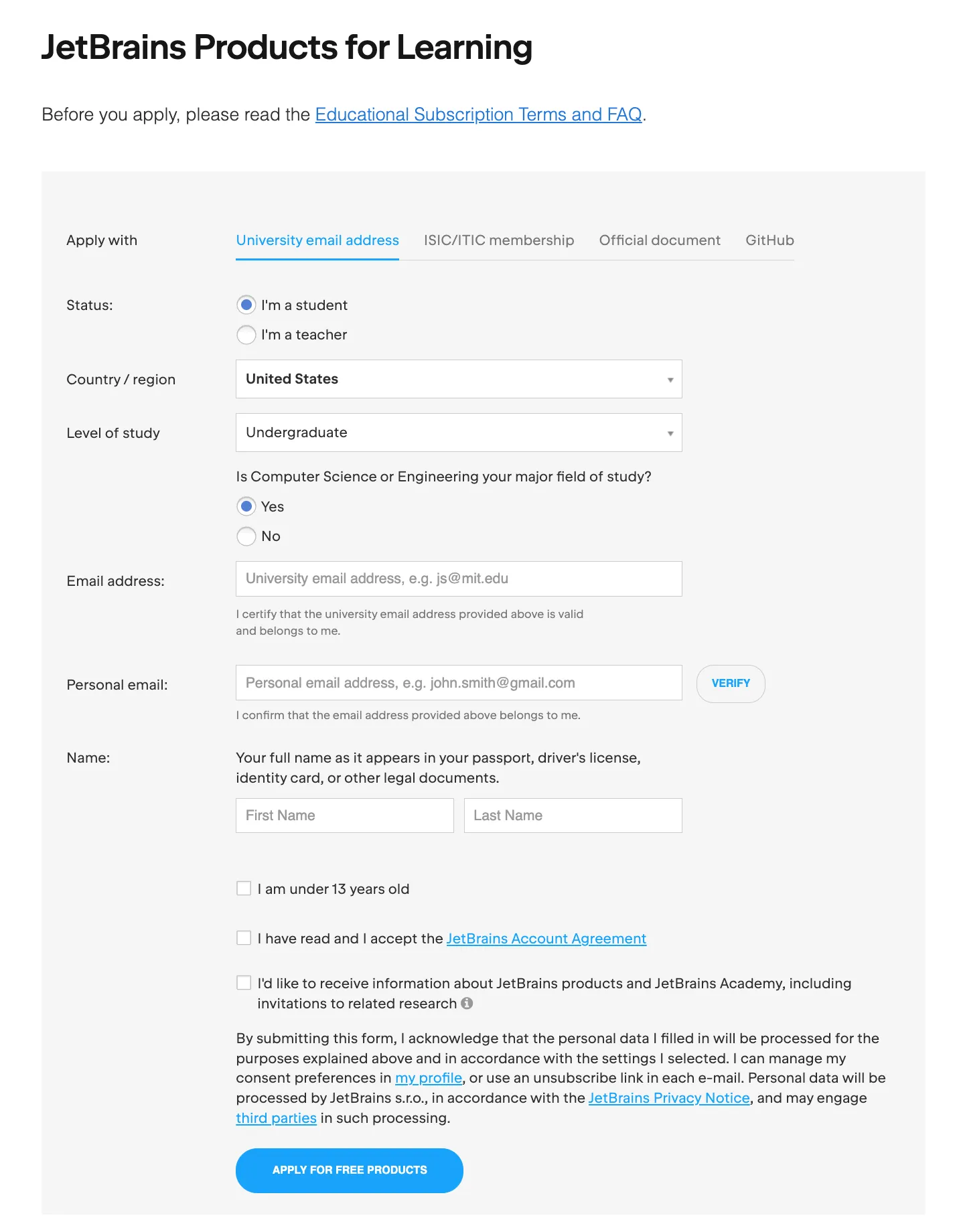
Enter your name, school, email, and other required details, then select a verification type.
If you already have GitHub Student Developer Pack, you can also complete verification through the GitHub authorization route.
Step 3: Complete Identity Verification
After submission, you will usually receive a verification email. Click the verification link to continue.
If you upload documents instead, your case may go through manual review, which usually takes longer and can take up to two weeks.
Step 4: Sign In to JetBrains Account and Activate
Once approved, sign in to your JetBrains Account to download and activate available IDEs.
Commonly included products are IntelliJ IDEA, PyCharm, WebStorm, CLion, Rider, PhpStorm, DataGrip, RubyMine, RustRover, DataSpell, and GoLand.
Documents to Prepare in Advance
To improve your approval chances, prepare clear and complete documents in advance, especially if you plan to use document-based verification.
Recommended checklist:
- School email address
- Student ID (with your name and enrollment details)
- Enrollment certificate (preferably with date)
- ISIC/ITIC card (if available)
- GitHub Student Developer Pack account (if available)
License Duration and Renewal
JetBrains student licenses typically remain active while your student status is valid, but approval is not permanent after a single application.
When the license expires, you usually need to renew or re-verify. If your student status changes, your eligibility may also be affected.
If you are close to graduation, check the official Graduate Offer. According to JetBrains, after Student Pack expires, you can usually get 40% off any JetBrains product for up to two years, and the discount is automatically applied in your JetBrains Account.
What AI Features Are Included in Student Pack
JetBrains Student Pack includes limited-time access to JetBrains AI features integrated directly into the IDE, such as:
- AI code completion
- AI Chat
- AI Coding Agent (handles multi-step tasks using full project context)
This allows students to experience an AI-enhanced development workflow during the student period. After the AI trial period ends, other non-AI student benefits in the Student Pack remain available for free.
Frequently Asked Questions
Can I apply without a school email address?
Yes. You can still apply using ISIC/ITIC, GitHub Student Developer Pack, or official enrollment documents.
Can non-CS majors apply?
Usually yes. The review is based on valid student status, not on whether you study computer science.
How long does approval usually take?
School email verification is often fast. Document-based verification can take longer, up to two weeks. Applying early is recommended.
Is it completely free?
Yes. JetBrains Student Pack is a free educational license, not a coupon-based discount. As long as your student status remains valid, you can keep using eligible licenses for free.
Can I use the student license on multiple computers?
Yes. Similar to a personal subscription model, Student Pack lets you sign in and use the same student license across multiple devices.
I am a student with a part-time job. Can I use the student license for work?
No. JetBrains student licenses are for non-commercial educational use only (including academic research). If you are interning, employed, or working on commercial projects, use a commercial license through your employer. For freelance commercial work, use a personal commercial subscription.
How do I apply for the free JetBrains Student Pack?
Click Request now on the official page, then complete student verification through one of the following methods:
- School email address
- ISIC/ITIC card
- GitHub Student Developer Pack account
Final Thoughts
If you are a student, JetBrains Student Discount is one of the highest-value developer benefits available: low application barrier, high practical value, and broad IDE coverage.
The fastest route is usually school email verification. If you do not have one, use GitHub Student Pack or official enrollment documents instead.